
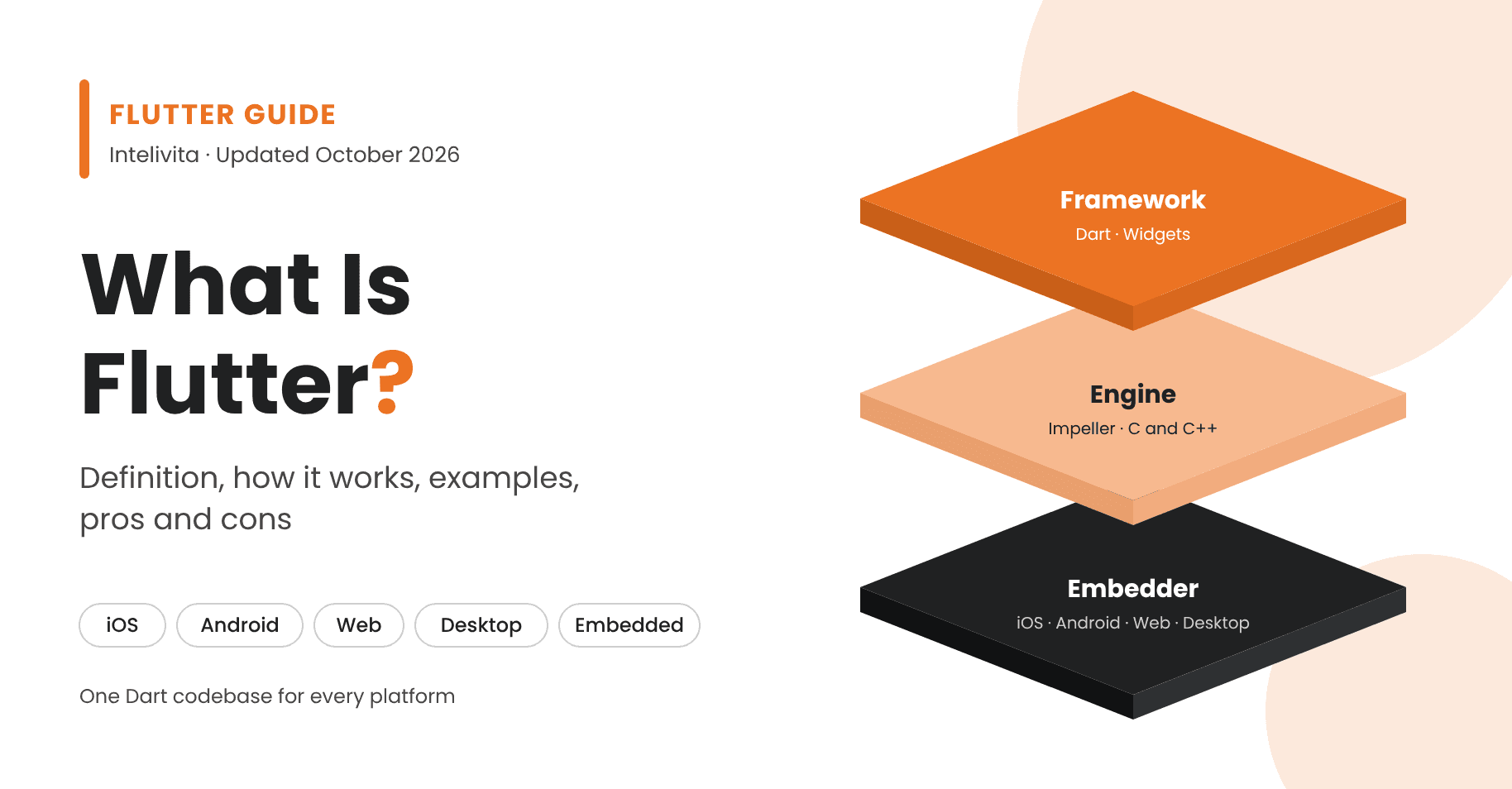
Flutter is Google's free, open-source UI software development kit (SDK) for building natively compiled apps for iOS, Android, web, Windows, macOS and Linux from one codebase. Developers write Flutter apps in Dart, a programming language also created by Google. Every part of the interface is a widget, which Flutter draws itself with its Impeller rendering engine rather than using each platform's built-in controls. Hot reload shows code changes in a running app in under a second, so teams build and test faster than with two separate native apps.
| Made by | Google, with open-source contributors |
|---|---|
| First stable release | Flutter 1.0, 4 December 2018, London |
| Language | Dart |
| Licence and price | BSD 3-Clause; free |
| Rendering engine | Impeller |
| Platforms | iOS, Android, web, Windows, macOS, Linux, embedded |
| Type | Frontend (client-side) UI framework |
What Is Flutter?
Flutter is an open-source framework for building user interfaces that run on mobile, web, desktop and embedded devices from a single Dart codebase. Google manages the project, and hundreds of open-source contributors and companies add to it.
The Flutter SDK includes everything needed to build and ship an app:
- a reactive framework written in Dart
- a rendering engine, Impeller
- ready-made widget libraries for Material Design 3 and Cupertino (iOS style)
- testing APIs
- plugin interfaces to native code
- Flutter DevTools for debugging and profiling
- command-line tools for creating, building and releasing apps
Unlike most cross-platform tools, Flutter doesn't rely on web views or the operating system's own widgets. It renders every pixel itself, so the same app looks and behaves the same on every device.
Who Created Flutter and When?
Google created Flutter. It first appeared in 2015 under the codename "Sky", shown at the Dart Developer Summit as an Android experiment that aimed to render at 120 frames per second. Google released Flutter 1.0, the first stable version, on 4 December 2018 at the Flutter Live event in London. Since then, Flutter has added stable support for web, Windows, macOS and Linux, and Google ships stable releases several times a year.
Is Flutter a Programming Language?
No, Flutter is not a programming language. It is a framework and SDK, and Flutter apps are written in Dart. Dart handles the app's logic and syntax. Flutter supplies the widgets, the rendering engine and the tools that turn that code into an app for each platform.
Is Flutter Free?
Yes, Flutter is free. It is open source under the BSD 3-Clause licence, and its source code is on GitHub. Companies can use, modify and ship Flutter in commercial apps without paying a licence fee. The costs of a Flutter project are design, development and maintenance, not the framework.
Is Flutter Frontend or Backend?
Flutter is a frontend framework. It builds the screens, navigation and interactions that people use, and it runs on the user's device or in the browser. A Flutter app gets its data from a backend through APIs. That backend can be Firebase, a Node.js or .NET service, or any existing system.
What Is Flutter Used For?
Flutter is used to build apps that need to run on iOS and Android from one codebase, often with a web or desktop version as well. Businesses choose it when they want one team, one release schedule and the same branded design on every device.
Flutter builds apps for these platforms:
- Mobile: iOS and Android phones and tablets
- Web: apps that run in modern browsers, compiled to JavaScript or WebAssembly
- Desktop: Windows, macOS and Linux
- Embedded: screens in cars, appliances and kiosks. Toyota uses Flutter for in-car infotainment systems.
Common types of Flutter app include:
- banking and fintech apps
- ecommerce and marketplace apps
- health and wellbeing apps
- booking and on-demand service apps
- internal business tools
- MVPs that need to reach both app stores quickly
From our projects
Intelivita has used Flutter to build apps for dermatology triage, health research, financial advice, fitness coaching, shift tracking, shuttle transport and student rewards. The projects are listed under Flutter Apps Built by Intelivita ↓.
How Does Flutter Work?
Flutter works in three layers: the Dart framework your app is written in, a C and C++ engine that draws every pixel, and a platform embedder that runs the app on each operating system.
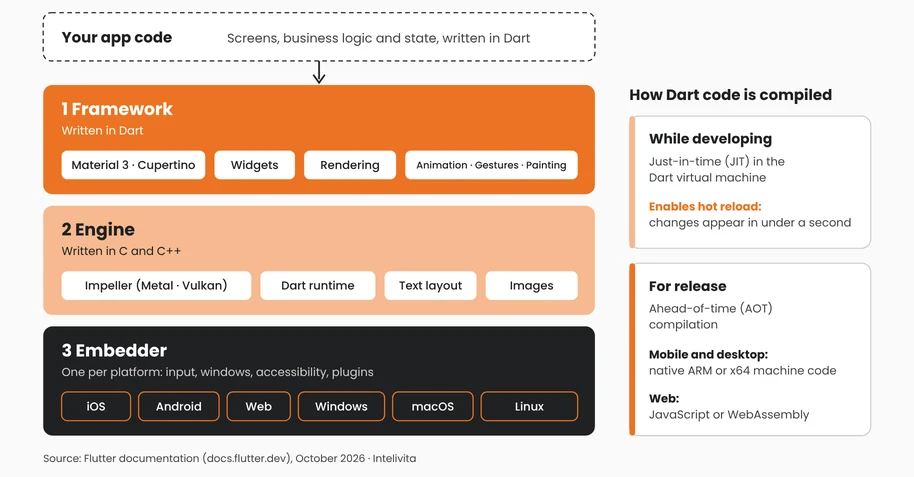
- Framework (Dart). This layer holds the widgets, layout, animation, gestures and app logic. Flutter's UI is declarative: each widget describes what the screen should look like for its current state, and the framework rebuilds the parts that change.
- Engine (C and C++). The engine renders the UI with Impeller, Flutter's default rendering engine. Impeller uses Metal on iOS and Vulkan on Android. Impeller is the only renderer on iOS, and since Flutter 3.27 it is also the default on Android API 29 and above. Older Android devices fall back to an OpenGL renderer automatically. The engine also handles text, images and the link to the Dart runtime.
- Embedder (per platform). The embedder packages the app for each operating system and connects it to that system's input, windows, accessibility and plugins.
Dart code is compiled in two ways:
- During development, Dart runs in a virtual machine with just-in-time (JIT) compilation. This is what makes hot reload possible.
- For release, Dart is compiled ahead of time (AOT) into native ARM or x64 machine code for mobile and desktop, and into JavaScript or WebAssembly for the web.
Because there is no interpreter or JavaScript bridge, Flutter apps can animate smoothly at 60 or 120 frames per second.
When an app needs a device feature, such as the camera, Bluetooth or payments, it uses a plugin from pub.dev. If no plugin exists, it calls native Swift, Kotlin, Java or C code through platform channels or Dart FFI.
What Are the Core Components of Flutter?
Flutter has six core components: widgets, the Dart language, the Impeller rendering engine, the Material and Cupertino design libraries, hot reload, and its developer tools and package ecosystem.
- Widgets. Widgets are the building blocks of every Flutter app. Each one describes part of the interface: a button, a text field, padding, a row or a whole screen. Developers combine small widgets into larger ones, so the app's UI is one widget tree. Stateless widgets show fixed content. Stateful widgets update when data changes.
- Dart. Dart is the object-oriented, strongly typed language Flutter apps are written in. It supports asynchronous code for network calls and animations. It also compiles to machine code for release builds, which keeps Flutter apps fast.
- Impeller rendering engine. Impeller draws the interface directly onto the screen using the device's graphics hardware. It precompiles its shaders, which removes the stutter older Flutter apps sometimes showed the first time an animation ran.
- Material Design 3 and Cupertino widgets. Flutter ships with full libraries for Google's Material Design 3 and for Apple's iOS style. Teams can follow either design language closely, or customise both to match a brand.
- Hot reload. Hot reload injects code changes into the running app in under a second without losing its current state. A developer can adjust a layout or fix a bug and see the result on the same screen straight away.
- DevTools and pub.dev. Flutter DevTools profiles performance, inspects the widget tree and tracks memory. pub.dev, the Dart and Flutter package repository, provides ready-made packages for cameras, maps, payments, analytics, authentication and more.
What Is a Flutter App?
A Flutter app is any mobile, web or desktop application built with the Flutter SDK and written in Dart. One codebase produces the iOS app, the Android app and, if needed, the web and desktop versions.
A Flutter app installs and runs like any other app. People download it from the Apple App Store or Google Play, and nothing on the screen shows how it was built. The difference is underneath. A native iOS app uses Apple's UIKit or SwiftUI, and a native Android app uses Android's own views or Jetpack Compose. A Flutter app draws its own widgets with Impeller, so its design and behaviour stay the same on both platforms.
Flutter Apps Built by Intelivita
Intelivita has built and published nine Flutter apps as case studies. Each one serves iOS and Android from one codebase and connects to its own back end.
| App | Sector | What it does | Native and service integrations | Back end |
|---|---|---|---|---|
| Bantham RADAR | Dermatology | Lets patients send skin condition information remotely for faster triage | — | Node.js, MySQL |
| ENDO1000 | Health research | Collects structured health data from about 1,000 study participants | Next.js website and admin | Node.js, PostgreSQL, AWS |
| Lifetime Financial Wellbeing | Financial advice | Gives individuals and organisations digital financial advice and wellbeing support | Real-time chat, Stripe | Laravel, MySQL |
| Ostique Connect | Peer health support | Connects people living with a stoma with peers who share their experience | Real-time chat, Stripe | Laravel, MySQL |
| Elite Pickleball Coaching | Sports coaching | Delivers structured remote coaching to pickleball athletes | Chat, Stripe | Laravel, MySQL, AWS |
| Cronos | Work and earnings | Tracks shifts and calculates earnings live across several jobs | Background shift tracking, system notifications, Firebase OTP | Laravel, MySQL |
| Sky Shuttle Bus | Transport | Runs shuttle services across London and Cambridge Research Park | Google Maps, Samsara live vehicle location | Laravel, MySQL |
| LocalLinked | Student rewards | Rewards students for engaging with local businesses and charities | NFC tags, Google Maps, Stripe | Laravel, MySQL |
| Satiate | Weight management | Supports people moving from weight-loss medication to long-term maintenance | Apple and Google in-app purchases, Firebase notifications | Node.js, MySQL |
Which Famous Apps Are Built with Flutter?
Famous apps built with Flutter include Google Pay, Google Ads, BMW's app, eBay Motors, Nubank, Virgin Money and Headspace. Each company in this table is listed on the official Flutter showcase.
| App | Company | Category | Note from the Flutter showcase |
|---|---|---|---|
| Virgin Money | Virgin Money (UK) | Banking | Unified its app development on one codebase |
| Headspace | Headspace | Mental health | Mental health support app |
| My BMW | BMW Group | Automotive | Customer-centric product development |
| Google Pay | Payments | Expanding globally | |
| Google Ads | Advertising | Listed under Flutter at Google | |
| NotebookLM | AI research assistant | Built and shipped in 7 months | |
| eBay Motors | eBay | Vehicle marketplace | Improved developer experience |
| Nubank | Nu | Banking | Scaling a digital bank |
| Xianyu | Alibaba Group | Second-hand marketplace | Alibaba's resale app |
| Whirlpool | Whirlpool | Smart appliances | 50% lower development costs |
| Reflectly | Reflectly | Journaling and wellbeing | Digital wellness experiences |
| Philips Hue | Signify | Smart lighting | Listed among companies using Flutter |
The range in the table matters more than the brand names. Banks, car makers, marketplaces and appliance makers all use Flutter in production, and their apps serve millions of users.
What Are the Advantages of Flutter?
The main advantages of Flutter are one codebase for every platform, near-native performance, the same custom design on every device, and faster development through hot reload.
- One codebase. A single Dart codebase produces the iOS and Android apps, plus web and desktop versions if needed. New features and fixes ship to every platform in the same release. One team maintains one project instead of two.
- Near-native performance. Release builds compile ahead of time to machine code, and Impeller renders on the device's GPU. Animations and scrolling run at 60 or 120 frames per second on modern phones.
- Consistent, custom UI. Flutter draws its own widgets, so a branded design looks the same on an iPhone and an Android phone. Designers aren't limited to the controls each platform provides. Reflectly, for example, uses Flutter's custom widgets for the same design on iOS and Android.
- Faster development. Hot reload shows changes in under a second while keeping the app's state. Developers and designers can adjust screens together and see the result live.
- Reach beyond mobile. The same codebase can target web, Windows, macOS, Linux and embedded screens. Toyota uses Flutter for car infotainment, and LG uses it for its webOS platform.
- Backed by Google, with a large ecosystem. Google builds its own products with Flutter, including Google Pay, Google Ads, Google Classroom and NotebookLM. pub.dev holds thousands of packages for common features.
What Are the Disadvantages of Flutter?
The main disadvantages of Flutter are larger app downloads, extra work for some native features, a smaller pool of Dart developers, and weak SEO for content-heavy websites.
- Larger app size. Every Flutter app bundles the Flutter engine, which adds a few megabytes compressed to the download. Assets, fonts and packages usually affect size more than the engine. Still, a very small native app will download faster than the same app in Flutter.
- Some native features need extra work. Most device features are available through plugins. New or specialised APIs, such as advanced camera controls, AR or a feature Apple has just released, may need custom native code through platform channels. Some third-party plugins are poorly maintained, so each one should be checked before use.
- Smaller Dart talent pool. Fewer developers know Dart than JavaScript, Kotlin or Swift. Developers with Java, Kotlin, Swift or TypeScript experience usually learn it quickly, but hiring an experienced Flutter team takes more searching.
- An exact native iOS feel takes effort. Flutter's Cupertino widgets imitate iOS rather than use Apple's own controls. Apps that must match the latest iOS behaviour exactly need extra design and testing work.
- Flutter web isn't built for SEO-led sites. Flutter web is designed for app-like experiences, such as dashboards and tools. For a marketing site or blog that needs to rank in Google, a standard web framework is a better choice.
In practice: from our projects
Three of Intelivita's Flutter apps needed features beyond standard widgets:
- Cronos keeps tracking a shift in the background and lets users control it from system notifications on iOS and Android.
- Sky Shuttle Bus shows live vehicle positions from Samsara on Google Maps.
- LocalLinked reads NFC tags at partner locations.
Each feature needed specific integration work and testing on both platforms. Planning these early is what keeps a Flutter project on schedule.
Is Flutter Still Worth Using in 2026?
Yes. Flutter is still worth using in 2026 for most apps that need iOS and Android from one team. Google continues to build its own apps with it, including Google Pay and NotebookLM. Banks such as Virgin Money and Nubank, and car makers such as BMW and Toyota, run production apps on it. Stable releases continue several times a year.
Flutter isn't the right choice for every app, though:
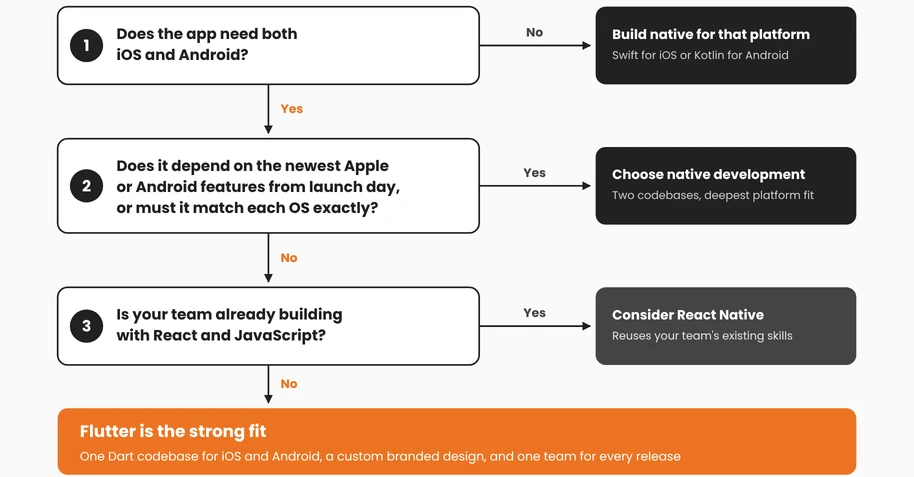
| Choose Flutter when | Choose native development when |
|---|---|
| You need iOS and Android, and possibly web, from one team | The app depends on the newest Apple or Android features from the day they launch |
| The design is custom and branded rather than standard iOS or Android | The app must match each platform's default look and feel exactly |
| You want to launch an MVP on both app stores quickly | The app is a small utility where download size is critical |
| You want one codebase to maintain over the long term | Your team already has separate, experienced iOS and Android developers |
"I've built mobile apps since 2010, starting with native iOS, and Flutter is now our first choice for most apps that need both iOS and Android. One codebase means one team, one release schedule and the same design on every device. We only advise native when an app depends on a feature Apple or Google released last month, or must match each platform exactly."
 Dhaval Sarvaiya
 Co-Founder, Intelivita
Flutter vs React Native vs Native Development
The main difference is how each one draws the interface. Flutter renders its own widgets with Impeller. React Native maps JavaScript components to each platform's native UI controls. Native development uses each platform's own language and tools.
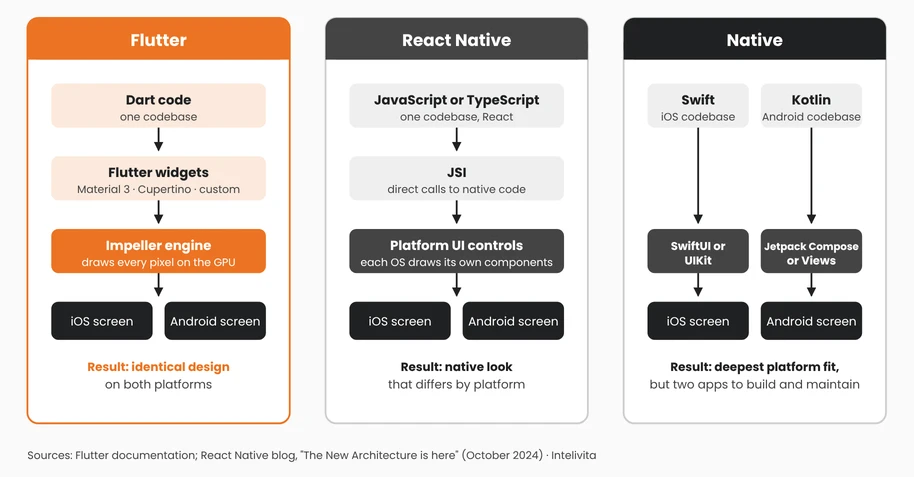
| Feature | Flutter | React Native | Native (Swift and Kotlin) |
|---|---|---|---|
| Created by | Meta | Apple (Swift); JetBrains (Kotlin, Google's preferred Android language) | |
| Language | Dart | JavaScript or TypeScript | Swift for iOS, Kotlin for Android |
| How the UI is drawn | Own widgets, rendered by Impeller | The platform's native UI controls | The platform's native UI controls |
| Code shared across iOS and Android | UI and logic, usually most of the app | UI and logic, usually most of the app | None; two separate apps |
| Performance | Compiled to machine code; near-native | Near-native, with direct calls to native code through JSI | Best possible on each platform |
| Design consistency | Identical on both platforms | Follows each platform's native look | Follows each platform's native look |
| Best for | Custom-designed apps on several platforms from one team | Teams with JavaScript and React skills | Apps that need the deepest platform integration |
React Native has used its New Architecture by default since version 0.76 (October 2024). JavaScript now talks to native code directly through the JavaScript Interface (JSI) instead of the old asynchronous bridge. Older comparisons that call React Native slow because of "the bridge" are out of date.
Flutter and React Native are both cross-platform frameworks. The choice between them usually depends on your team's skills and how custom the design is. If your team already knows React, React Native is often the faster start. If the app needs a highly branded interface that looks identical everywhere, Flutter is usually the stronger fit. A fully native app still makes sense when the product depends on each platform's newest features.
What Are the Main Alternatives to Flutter?
The main alternatives to Flutter are React Native, Kotlin Multiplatform, .NET MAUI and Ionic.
- React Native: Meta's framework for building iOS and Android apps with JavaScript or TypeScript and React. It has a large community and suits teams that already build React web apps.
- Kotlin Multiplatform: JetBrains' technology for sharing Kotlin code across Android, iOS, web and desktop. Teams can share only the business logic and keep native interfaces, or share the UI too with Compose Multiplatform. Its iOS support has been stable since May 2025.
- .NET MAUI: Microsoft's framework for building mobile and desktop apps in C#. It replaced Xamarin, whose support ended on 1 May 2024, and suits companies already built around .NET.
- Ionic: a framework that builds mobile apps from HTML, CSS and JavaScript running inside a web view, with Angular, React or Vue. It is quick for web teams, but its apps are hybrid apps and run more slowly than Flutter for complex animation.
How Is a Flutter App Built?
A Flutter app is built in six stages: discovery, design, development, native integration, testing and release. One team works on one codebase throughout, instead of separate iOS and Android teams.
- Discovery and scope. Define the users, core features, platforms (iOS, Android, web or desktop) and the backend the app will connect to. Confirm early that Flutter plugins exist for every device feature the app needs.
- UX and UI design. Design screens and flows once. Decide whether the app follows Material Design, the iOS style, or a custom brand style applied on both platforms.
- Development in Dart. Build the screens from widgets, add the app logic and state management, and connect the backend through APIs. Hot reload lets the team check every change on real devices straight away.
- Native integration. Add plugins for features such as the camera, location, push notifications and payments. Write native Swift or Kotlin code through platform channels only where no reliable plugin exists.
- Testing. Run Flutter's unit, widget and integration tests. Test on a range of real iPhones and Android phones, and use Flutter DevTools to find slow frames and memory issues.
- Release. Build a release version for each store with Android Studio and Xcode. Submit the app to Google Play and the Apple App Store, then ship updates to both from the same codebase.
The general steps to create an app are the same whatever the framework. Flutter changes how stages 3 to 6 run, because every step happens once rather than twice. A simple app usually takes 8–12 weeks, and an advanced one 6–9 months or more.
What Does a Typical Flutter Project Stack Look Like?
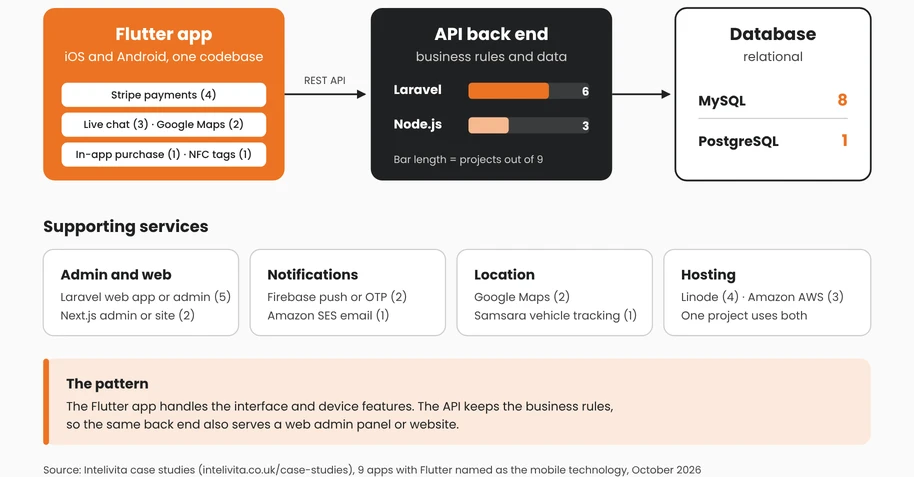
A typical Flutter project pairs the Flutter app with a REST API, a relational database and cloud hosting. Across Intelivita's nine published Flutter case studies:
- API: six use Laravel and three use Node.js
- Database: eight use MySQL and one uses PostgreSQL
- Payments: four take payments through Stripe
- Notifications and sign-in: two use Firebase for notifications or one-time passcodes
- Maps: two use Google Maps
The Flutter app holds the interface and device features. The API holds the business rules, so the same back end can also serve a web admin panel.
Which State Management Should a Flutter App Use?
Most Flutter apps use Provider, Riverpod or Bloc to manage state, meaning the data that changes while the app runs and the screens that depend on it.
- Provider: a lightweight option that fits small and medium apps where data is shared across a few screens.
- Riverpod: a newer option by Provider's author, with compile-time safety and better handling of asynchronous data. It suits growing apps with complex dependencies.
- Bloc: keeps business logic separate from the UI, using streams of events and states. It suits large apps and teams that need strict structure and easy testing.
How Much Does a Flutter App Cost?
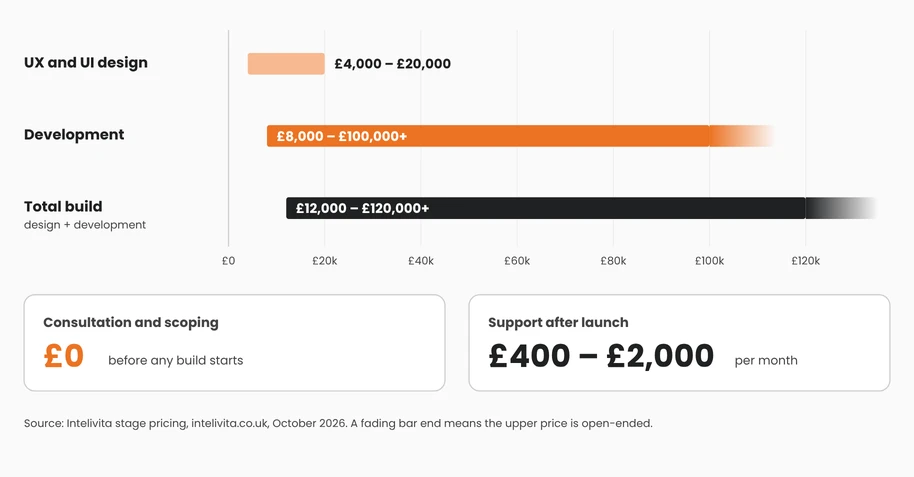
At Intelivita, a Flutter app costs from £12,000 to £120,000+, depending on its features, design and integrations. That covers UX and UI design (£4,000–£20,000) and development (£8,000–£100,000+). Ongoing support costs £400–£2,000 a month. Because one codebase serves iOS and Android, a Flutter app usually costs less than building two separate native apps with the same features. The number of platforms is one of the biggest drivers of overall app development cost.
What Does a Flutter Developer Do?
A Flutter developer builds cross-platform apps with Flutter and Dart. They design widget-based interfaces, manage app state, connect apps to backends through APIs, and add native features through plugins or platform channels. An experienced Flutter developer also knows Xcode and Android Studio, because every app still has to be built, signed and released separately for each store. Businesses that need a team for a full project can work with Intelivita's Flutter app developers, who handle everything from design to App Store and Google Play release.
Frequently Asked Questions About Flutter
Is Flutter for iOS or Android?
Flutter is for both. One Flutter codebase produces an iOS app and an Android app, and it can also build web, Windows, macOS and Linux versions.
Is Flutter hard to learn?
Flutter is not hard to learn for developers who know an object-oriented language. Developers who already use Java or Kotlin, the main Android development languages, or Swift on iOS, pick up Dart quickly. Hot reload makes it easy to experiment.
Does anyone still use Flutter?
Yes. Google builds Google Pay, Google Ads, Google Classroom and NotebookLM with Flutter. Companies including BMW, Toyota, Virgin Money, Nubank and eBay Motors also use it in production apps.
Is Flutter written in C++?
Partly. Flutter's engine is written in C and C++, and its framework and widgets are written in Dart. Developers who build Flutter apps write only Dart, unless they add native code for a specific device feature.
Can Flutter build web apps?
Yes. Flutter builds web apps that compile to JavaScript or WebAssembly and run in modern browsers. It suits app-like products such as dashboards and tools better than content websites that need to rank in search engines.
Will Apple or Google reject a Flutter app?
No. Apple and Google accept Flutter apps in the App Store and Google Play. A Flutter app goes through the same review as any other app and must follow Apple's App Store Review Guidelines and Google Play's policies.