

An augmented reality (AR) app uses a phone's camera and motion sensors to superimpose 3D content onto a live view of the real world. The content can be anchored to a surface, track a face or product, appear suspended in the space around the user, or be triggered when they reach a particular location. Intelivita builds AR apps from £10,000 excluding VAT, with typical development timelines of 6–20 weeks. The AR features, 3D content and level of interaction determine the final cost and timeline.
| AR apps Key Facts | |
| What an AR app does | Overlays 3D content on surfaces, faces, images or objects, places it in surrounding space, or triggers it at specific locations through a phone or tablet camera. |
| Cost in the UK (Intelivita) | From £10,000 excluding VAT |
| Build time | 6–20 weeks |
| Typical projects | AR product placement / virtual try-on: £10k+, 6–8 weeks. Assembly & repair guides: £15k–£22.5k, 8–12 weeks. Assembly guides with error detection: £20k–£30k, 12–15 weeks. Interactive storybook: £16k–£24k, 14–20 weeks. |
| Runs on | Phone and iPad (ARKit), supported Android phones (ARCore), mobile browsers (WebAR), and compatible passthrough headsets such as Meta Quest 3 and 3S |
| Built with | Unity AR Foundation, ARKit and ARCore. |
| Good fit | Visualising products in your space; interactive assembly and repair instructions overlaid on products; storybooks with animated characters that appear on the page. |
| Poor fit | Content that works just as well through images, video or on-screen animation, where placing it in the real world adds no benefit. |
What is an augmented reality app?
An augmented reality app adds digital content, such as 3D models, labels or animations, to a live camera view and keeps that content fixed in place as the user moves. The digital content stays aligned with a surface, face, object or location as the user moves.
Augmented reality (AR) is technology that adds digital content to a person's view of the real world. Virtual reality (VR) replaces that view with a fully digital one.
Tom Caudell coined the term "augmented reality" at Boeing in the early 1990s, for a headset that guided workers through aircraft wiring. AR apps reached ordinary phones in 2017, when Apple released ARKit and Google released ARCore.
| Augmented reality (AR) | Mixed reality (MR) | Virtual reality (VR) | |
| What the user sees | The real world with a digital layer on top | The real world with digital objects that react to it | A fully digital world; the room is hidden |
| Device | Phone, tablet or smart glasses | Headset with depth sensors (Apple Vision Pro, Meta Quest 3) | VR headset |
| How content relates to the room | Sits on surfaces; ignores most objects | Walks round a real table, stops at a real wall | No relation |
| Example | Placing a sofa in your living room before buying it | A virtual trainer pointing at parts of a real engine | A flight or safety simulator |
| Typical business use | Product visualisation, try-on, instructions, marketing | Training, design review | Simulation training The line between AR and MR is blurring. A phone with depth sensing can now hide a virtual object behind a real chair (occlusion), which used to need a headset. |
How does an AR app work?
An AR app works by tracking the phone's position and the surfaces around it, then drawing 3D content locked to those surfaces. The app repeats this five-step loop on every frame the camera captures.
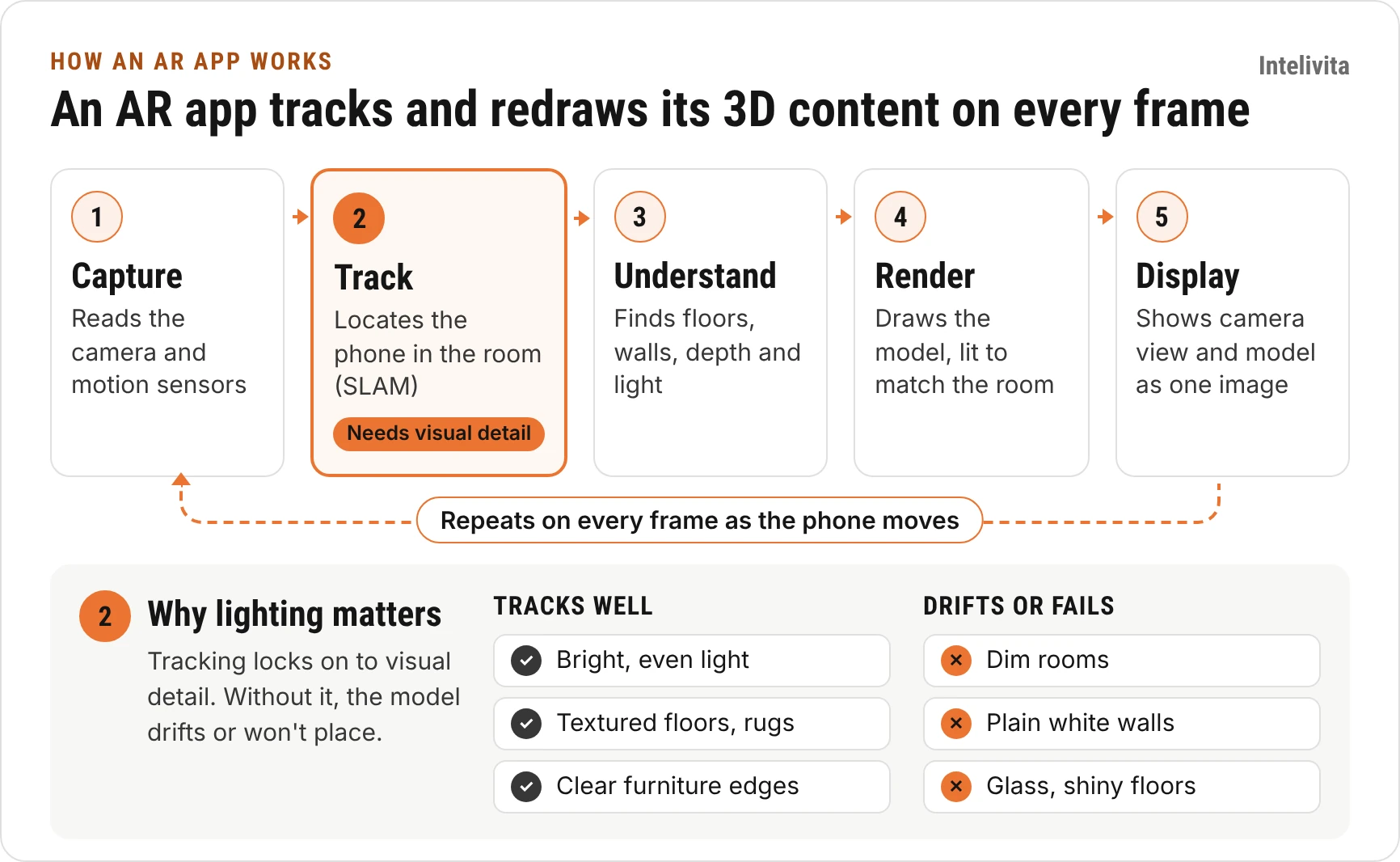
Tracking in an AR app (step 2) relies on visual detail in the camera image. AR apps struggle in dim rooms, on plain white walls and on glass or shiny floors, because the camera has nothing to lock on to. On iPhone and iPad, Apple's ARKit runs this loop; on Android, Google's ARCore does. Both are explained further in our guides to iOS app development and Android app development.
What devices run AR apps?
AR apps run on most current iPhones and iPads and on Google-certified Android phones; headsets need a separate build.
| Device | Framework | Depth sensing | When to target it |
| iPhone and iPad | ARKit | LiDAR on Pro models from iPhone 12 Pro and iPad Pro (2020); camera only on others | Almost every consumer AR app |
| Android phones | ARCore, on Google-certified devices running Android 7.0 or later | Depth estimation through ARCore's Depth API on supported devices | Any app that needs reach beyond iPhone users |
| Mobile browser | WebAR: WebXR in Chrome on Android, AR Quick Look on iPhone | Varies by browser and device. | Campaigns, product pages, QR codes on packaging |
| Mixed reality headsets | visionOS (Apple Vision Pro), OpenXR (Meta Quest 3) | Yes | Training and design review; a separate build |
| Microsoft HoloLens 2 | Windows Mixed Reality | Yes | Avoid for new projects: production ended in 2024 and Microsoft support ends after 31 December 2027 |
LiDAR measures distances directly, helping apps place models faster and create detailed 3D maps of a room. ARKit's scene meshing requires a LiDAR-equipped device. These maps help digital objects respond to real surfaces and boundaries, enabling more realistic interactions within the physical space.
What are the types of AR apps?
The five types of AR app are surface, image, face, object and location AR, grouped by what holds the digital content in place. The type an AR app uses decides which devices it runs on, how much 3D work it needs and where it can fail.
| Type | Content is anchored to | Typical use | Choose it when | Watch out for |
| Surface (markerless) | Floors, tables, walls or any detected flat surfaces | Furniture and product placement | The product must be seen at true size in a room | Needs good lighting and visible surface detail. |
| Image (marker-based) | A printed image: packaging, poster, label | Packaging, print, exhibitions, museum labels | You control the printed trigger | The trigger image needs strong contrast; plain or repeating patterns track badly |
| Face and body | A face mesh, hands or body pose | Make-up, glasses and jewellery try-on, filters | The product is worn | Face data used to identify a person is special category data under UK GDPR |
| Object | A specific 3D object scanned in advance | Maintenance steps on a machine, interactive product manuals | Content must sit on one particular item | Every object must be scanned; similar-looking objects confuse tracking |
| Location (geospatial) | GPS position, refined by visual positioning | Tours, wayfinding, location-based games | Content belongs to a place | GPS alone drifts by several metres in cities |
Should you build a native AR app or WebAR?
Build a native AR app for repeat use and the best tracking; use WebAR for short experiences opened from a link or QR code with no download.
Intelivita's rule of thumb:
Choose a native AR app when the experience uses several or complex 3D models, a lot of animation, detailed content, or interaction with real-world objects.
Choose WebAR for simpler experiences, such as placing one product in a room, with few models and limited interaction. WebAR suits cases where users should open the experience straight from a link, without downloading an app.
What can a business use an AR app for?
A business should use AR when placing digital content in the real world adds value—whether that means visualising a product, guiding a physical task or bringing a place or printed page to life. If the experience works just as well without that connection to the real world, AR offers little additional benefit.
| Industry | How AR can be used |
| Retail and ecommerce | Customers place products in their own space or try them on virtually before buying. |
| Restaurants and hospitality | Diners view a life-sized 3D dish on their table to understand its appearance and portion size before ordering. |
| Field service, repair and diagnostics | Engineers or users follow interactive instructions overlaid on equipment to assemble, disassemble or replace parts, and work through diagnostic checks. |
| Education and training | Trainees walk around a full-sized virtual engine placed in their space, select individual parts and explore animations showing how they work. |
| Property and architecture | View a proposed building at its intended scale on the actual site, or overlay planned changes onto an existing space. |
| Healthcare | Students and doctors explore interactive 3D anatomy models and learn the steps of surgical procedures—for example, placing a virtual heart in front of them to examine its structures and follow an animated procedure. |
Which AR apps are worth learning from?
Six AR apps worth learning from are IKEA Kreativ, YouCam Makeup, Apple Measure, Google Lens, Pokémon GO and Snapchat Lenses through Camera Kit. Each one solves a problem that only works in the user's real surroundings; the right-hand column is the idea a business can reuse.
| App | AR type | What it does | What a business can copy |
| IKEA Kreativ (successor to IKEA Place, 2017) | Surface, plus a room scan using LiDAR where available | Scans a room, removes the existing furniture, places IKEA pieces, saves the design to the basket | Let customers test fit in their own room, then buy from the same screen |
| YouCam Makeup | Face tracking | Live make-up try-on through the front camera | Try-on for anything worn: make-up, glasses, jewellery, hats |
| Apple Measure | Surface, LiDAR depth on Pro models | Measures objects, people and spaces through the camera | A small utility (measure before you order) that removes a reason not to buy |
| Google Lens | Image and object recognition, with overlays | Translates text in place and identifies objects in view | Point the camera at a label and show product information, manuals or reorder links |
| Pokémon GO (owned by Scopely since May 2025) | Location | Places characters at real-world locations | Tie content to places: events, tours, store visits |
| Snapchat Lenses through Camera Kit | Face and world | Lets brands run Snapchat Lenses inside their own apps and websites | Build one lens and reuse it across your app, website and social channels |
What features does an AR app need?
Users judge an AR app on three things: whether the content stays where it was put, whether it looks real, and whether real objects can pass in front of it. Menus and screens matter less than in other apps.
| Feature | What the user notices | iPhone and iPad (ARKit) | Android (ARCore) |
| Plane detection | The model sits on the floor instead of floating | Yes | Yes |
| Anchors | Content stays put as you walk round it | Yes | Yes |
| Light estimation | The model is lit like the room it is in | Yes | Yes |
| Occlusion | People and furniture can pass in front of the model | People occlusion; full depth on LiDAR devices | Depth API on most active devices |
| Scene meshing | Content bumps into real walls and furniture | LiDAR devices only | No built-in mesh |
| Image and face tracking | Content locks to packaging or a face | Yes | Yes |
| Shared sessions | Two people see the same model in the same place | Yes | Yes (Cloud Anchors) |
| 3D file format | Models load without conversion | USDZ (AR Quick Look) | glTF / GLB (Scene Viewer) |
Four non-AR features decide whether the app pays back:
- Add to basket from the AR view. The decision is made in AR, so the purchase should happen there too.
- Analytics on AR sessions. Track placements, failed placements and time in view, not just app opens.
- Remote 3D content. New products are added from a content system, without an app store release.
- A fallback 3D viewer. Users on unsupported phones still see the product in 3D, just not in their room.
How is an AR app built?
An AR app is built in six stages, from requirements to support. Wherever possible, development and 3D content creation run in parallel to shorten delivery time. Developers build the interface and functionality using placeholder 3D objects, then integrate the finished models and animations as they become available.
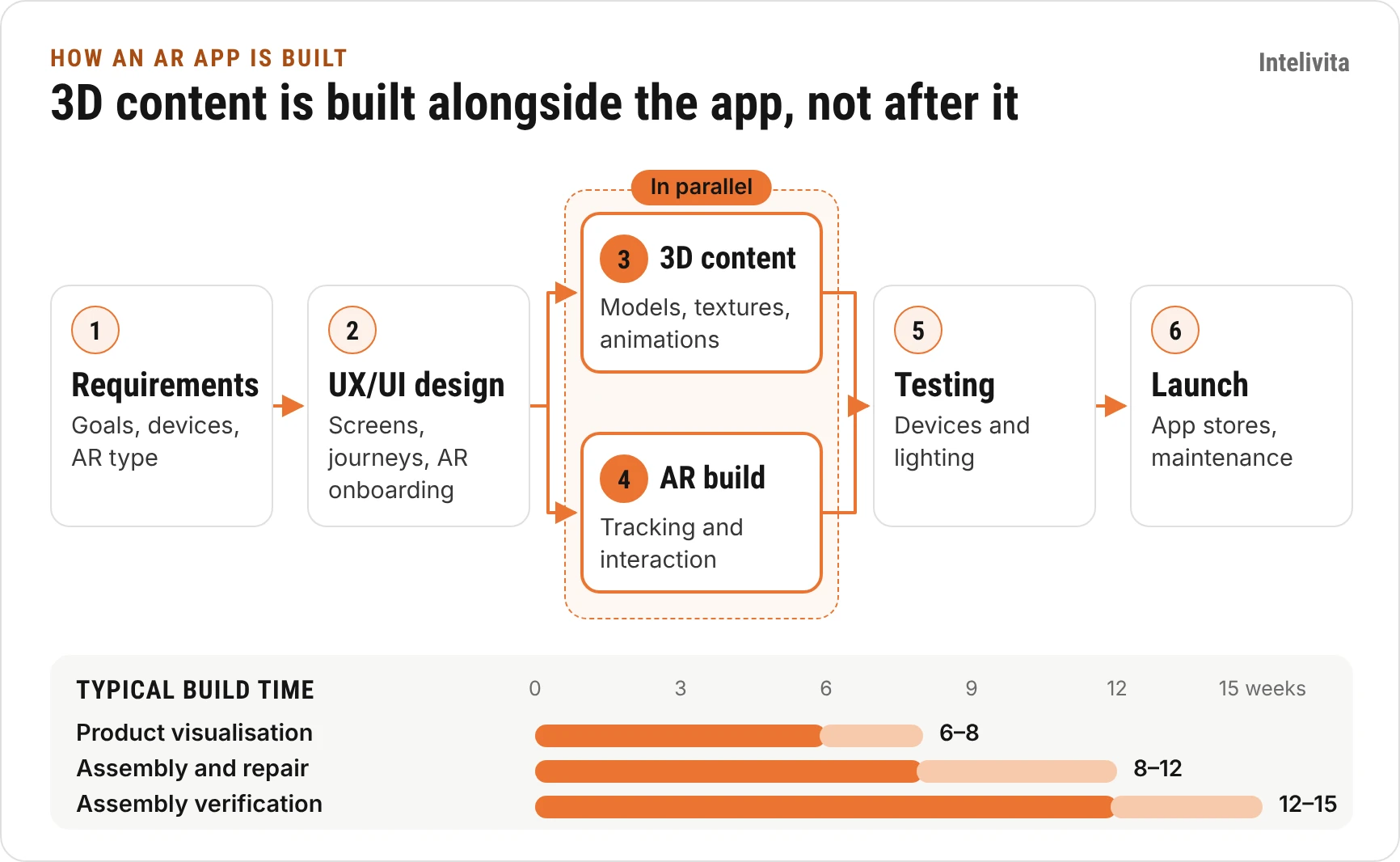
| Stage | What it covers |
| 1. Requirements | Goals, scope and target devices |
| 2. UX/UI design | App screens, user journeys and navigation |
| 3. Content creation | 3D models, textures, animations and illustrations |
| 4. AR development | Programming and integration, and interaction of the 3D content |
| 5. Testing | Testing on supported devices and in real-world environments |
| 6. Launch and support | Deployment, app-store submission where required, and ongoing maintenance |
Typical timelines range from 6–8 weeks for product visualisation or virtual try-on to 8–12 weeks for assembly and repair guides, 12–15 weeks for assembly verification, and 14–20 weeks for an interactive storybook. Each project follows the six stages, with content creation and development overlapping wherever possible.
| Tool | What it is used for |
| Unity with AR Foundation | Building AR applications for iOS and Android. Intelivita's main AR development stack. |
| WebAR tools | Building simpler AR experiences accessed through a website or link. |
| Blender or Maya | Creating 3D models, textures and animations. |
One Unity codebase serving iPhone and Android is the AR version of cross-platform app development: one build, two app stores.
How much does an AR app cost in the UK?
Intelivita's AR apps start from £10,000 excluding VAT, with typical development timelines of 6–20 weeks. The final cost depends largely on the quantity and complexity of the 3D content, animations and interactions required.
| Cost driver | Lower cost | Higher cost |
| Number of 3D models | A few products or characters | A large catalogue of products or characters |
| Model complexity | A simple product, such as a shoe | A detailed building with interiors or machinery with individual components |
| Animations | A few simple movements | Many unique animations or detailed sequences showing how something works |
| Interactions | Placing, rotating and resizing a model | Selecting components, following interactive assembly steps or checking for errors |
For example, placing a single piece of furniture in a room requires less work than creating a detailed building that users can explore, interact with and view floor by floor. More content and more complex behaviour increase the work involved—and therefore the cost.
What do typical AR apps cost?
These are Intelivita's standard AR project types, sorted by price. Each price covers the scope listed; more products, steps or platforms add to it.
| App type | Included scope | Estimated cost | Estimated timeline |
| AR Product Visualisation App | Up to 5 products · 3D product placement · Move, rotate and resize · Interactive product information | From £10,000 | 6–8 weeks |
| AR Assembly & Repair App | 2–3 products · 10–15 guided assembly or repair steps per product, up to 45 steps in total · Interactive 3D instructions | £15,000–£22,500 | 8–12 weeks |
| AR Assembly Verification App | 2–3 products · Up to 15 guided assembly steps per product · Interactive 3D instructions · Component recognition · Assembly checks and error detection · Real-world testing | £20,000–£30,000 | 12–15 weeks |
| AR Virtual Try-On App | 8–10 glasses styles · Face tracking · Frame and size switching · Product catalogue integration · Purchasing, payments and orders | From £10,000 | 6–8 weeks |
| Interactive AR Storybook | Up to 30 recognised pages · Custom page illustrations · 3–4 reusable 3D characters · Up to 10 unique animations · Interactiv | £15,000–£25,000 | 14–20 weeks |
After launch, an AR app needs a budget for Apple and Google developer accounts, hosting for 3D files, and updates when Apple or Google release new operating system versions. For apps without AR, see app development cost in the UK.
What makes AR apps hard to build?
Most AR failures come from the real world, not from the code: poor light, plain surfaces and the wide spread of phones people own. Each needs a plan before development starts.
| Problem | What the user sees | How it is handled |
| Dim light, plain walls, glass and shiny floors | The model drifts or will not place | An onboarding prompt to point at a textured floor; a fallback 3D viewer |
| Wide range of Android phones | The app works on one phone and not another | Test on a fixed set of ARCore-certified phones; check AR support at launch and hide AR on unsupported phones |
| Heavy 3D files | Slow loading; a large app download | Polygon and texture limits per model; compressed files; models downloaded on demand |
| Battery drain and heat | The phone gets warm; the frame rate drops | Lower detail on older phones; keep AR sessions short |
| Wrong scale | The sofa looks too big or too small | Models built from the manufacturer's dimensions; LiDAR used where available |
| Camera and face data | Users worry about what is recorded | Process camera frames on the device; under UK GDPR, face data used to identify a person is special category biometric data (ICO guidance, 2024) |
| A platform closing | The experience stops working | Build on open standards (WebXR, glTF) rather than a single hosted service |
How do you brief an AR project?
A useful AR brief names the object, the device, the place it will be used and one way to measure success. With those four answers, a developer can say which AR type fits and give a fixed price.
- What the user will see: a product, an instruction, a character, a building
- Where it will be used: at home, in a shop, on a factory floor, outdoors; and the lighting there
- Which devices: the phones your customers or staff use; whether a headset is needed
- 3D source files: CAD files, existing 3D models, photos, or nothing yet
- How many items, and how often they change: 5 products a year, or 500 a season
- Where the AR lives: inside an existing app, in a new app, or behind a web link
- One success measure: fewer returns, more add-to-baskets, faster training
- Data: whether the camera will see faces or the inside of customers' homes
Intelivita's AR team has built AR apps since 2017 and reviews each brief before quoting. The team returns an agreed scope, a fixed cost and an estimated timeline. Send your brief through our AR app development page; if the idea is still early, start with an MVP.
FAQs
What is AR?
AR (augmented reality) is technology that adds digital content, such as 3D models or labels, to a live view of the real world through a phone, tablet or headset.
Is AR the same as VR?
No. AR adds digital content to the real world, which stays visible; VR replaces the real world with a fully digital one and needs a headset
How much does an AR app cost in the UK?
Intelivita builds AR apps from £10,000 excluding VAT. A product visualisation or virtual try-on app starts at £10,000; an AR assembly verification app with component recognition costs £20,000–£30,000.
How long does it take to build an AR app?
Most AR apps take 6–20 weeks. A product visualisation app with up to 5 products takes 6–8 weeks; an assembly verification app takes 12–15 weeks.
Can AR work without an app?
Yes. WebAR opens from a link or QR code in the phone's browser. On iPhone it uses AR Quick Look with USDZ files; on Android it uses WebXR or Scene Viewer with glTF files. It has fewer features than a native app.