Food Delivery App: Definition, Types, Features, and Development

Co-Founder
A food delivery app is a mobile app that connects customers with restaurants and delivery services, enabling users to browse menus, place orders, and track deliveries. The food app simplifies transactions, reduces costs, and provides convenient food ordering services in London.
Food delivery apps are essential for expanding the market reach and for logistics providers managing last-mile delivery efficiently. The app drives business growth, improves customer satisfaction, and enables UK entrepreneurs to scale operations through mobile app development solutions that transform the food service industry.
What Is A Food Delivery App?
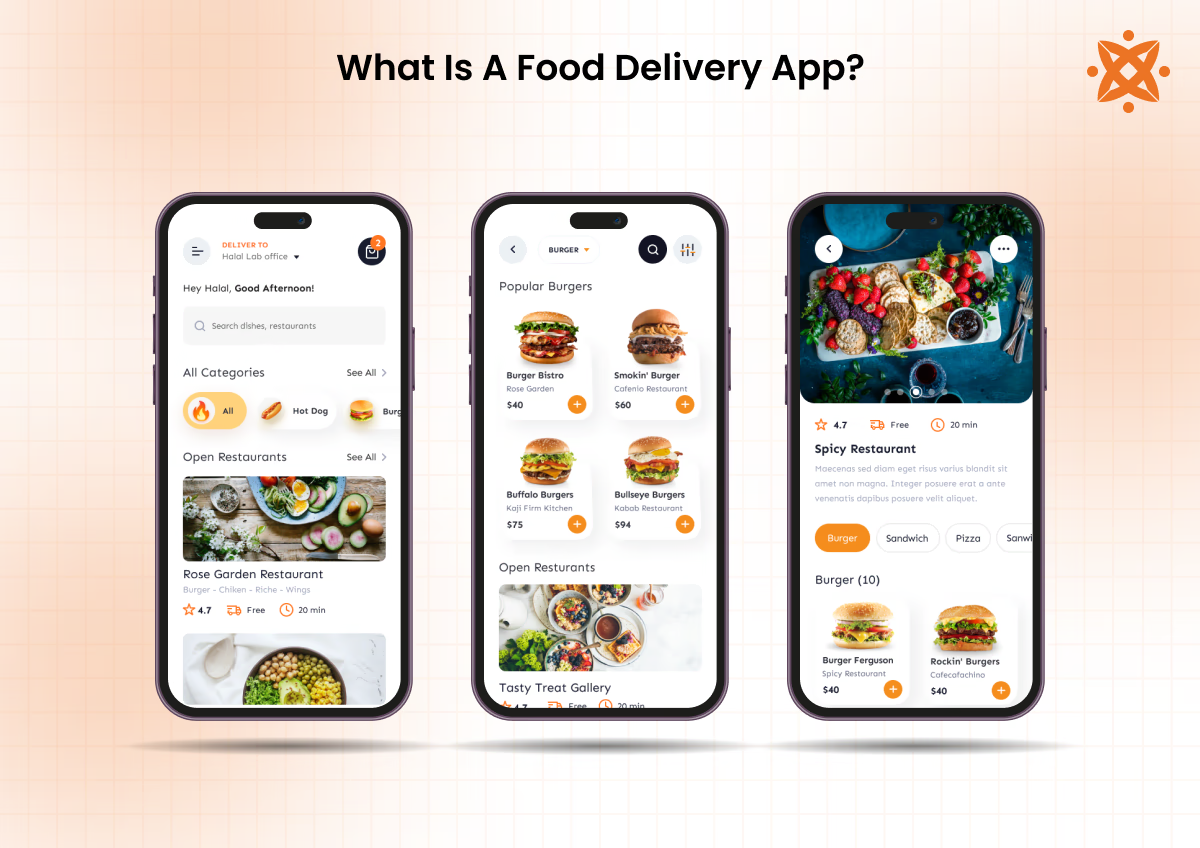
A food delivery app is a type of mobile app designed to facilitate the ordering and delivery of food from restaurants to customers. It provides features such as menu browsing, order placement, payment integration, and real-time order tracking, ensuring a smooth experience for users.
The interface includes user-friendly navigation for iOS, Android, or cross-platform systems, focusing on intuitive UI/UX.
Food delivery apps feature distinct sections for user registration, restaurant listings, and customer reviews to enhance functionality and trust.
The design uses visual elements like high-quality images, easy-to-read menus, and secure payment gateways, which make the app visually appealing and reliable for users.
According to a study by Statista titled "Food Delivery Apps: Usage Statistics and Market Share," published in Global App Trends (2023), over 45% of smartphone users globally utilize food delivery apps at least once a month. These statistics underline the growing reliance on food delivery apps in modern lifestyles.
What Are The Different Types Of Food Delivery Apps?
The different types of food delivery apps are aggregator, dedicated restaurant, and logistics support apps. Consumers, restaurants, and delivery service providers in the UK rely on the three models to meet the needs in the food delivery industry. Each type operates differently and offers advantages depending on what users and businesses require.
Aggregator Apps
Aggregator apps are platforms that connect multiple restaurants to customers, offering a centered hub for menu browsing and order placement. These apps allow users to explore various dining options while letting restaurants manage delivery logistics.
Examples of aggregator food delivery apps include:
- Uber Eats: A globally popular aggregator app that enables users to access menus from thousands of restaurants with intuitive UI/UX and real-time order tracking.
- Grubhub: Grubhub provides easy ordering and payment integration, making it a favorite among U.S. customers.
- Zomato: A widely-used app in Asia and the Middle East, combining food delivery with in-depth customer reviews for better decision-making.
Dedicated Restaurant Apps
Dedicated restaurant apps are custom-made for individual brands, allowing restaurants full control over their UI/UX, branding, and customer interactions. These apps streamline operations like order placement, payment integration, and push notifications.
Examples of dedicated restaurant apps include:
- McDonald’s App: Offers exclusive deals, real-time order tracking, and fast food delivery, especially for McDonald’s customers.
- Domino’s App: Integrates menu browsing, delivery tracking, and a loyalty program to enhance the pizza ordering experience.
- Starbucks App: Provides a personal form of experience with features like mobile payments and rewards, catering to coffee lovers.
Logistic Support Apps
Logistic support apps focus on assisting restaurants and food providers with delivery operations by managing the logistics process. These apps enable efficient real-time order tracking and communication between drivers and restaurants.
Examples of logistic support apps include:
- Postmates: Known for its flexible delivery services, offering support to restaurants lacking in-house delivery teams.
- DoorDash Drive: A logistics platform that integrates with restaurant systems to handle delivery needs.
- Deliverect: Helps restaurants optimize delivery processes by connecting their systems with various delivery apps.
What Are The Key Features Of A Food Delivery App?
The key features of a food delivery app include user registration, intuitive menu browsing, payment gateways, real-time order tracking powered by GPS technology, and push notifications for updates and promotions. They ensure convenience for users and operational efficiency for businesses.
The main key features of a food delivery app are:
- User Registration and Profile Management: These features allow users to create accounts, store preferences, and manage order histories. They ensure a personal form of experience and make repeat transactions efficient.
- Intuitive Menu Browsing: This functionality provides users with easy navigation through restaurant offerings, detailed menus, and visual representations of dishes. It makes the process of selecting and ordering food simple.
- Payment Gateways: Integrated systems that support secure and diverse payment methods. They enable fast and reliable transactions, enhancing user trust.
- Real-Time Order Tracking with GPS Technology: This feature allows users to track their order's progress from preparation to delivery. It improves transparency and increases satisfaction by keeping users informed.
- Push Notifications: Alerts sent to users about order status updates, promotions, and discounts. They improve user engagement and ensure timely communication.
What Are The Benefits Of Using Food Delivery Apps For Businesses And Consumers?
The benefits of using food delivery apps for businesses and consumers include improved convenience and efficiency for restaurants. Thedelivery app benefits for food delivery help UK owners maximise the advantages while expanding reach and boosting engagement through push notifications.
- Doorstep Meal Ordering: Food delivery apps give users the ability to place restaurant orders from home, eliminating travel time.
- Wider Restaurant Audience Reach: Food services connect with customers well beyond their physical location, increasing sales volume without additional premises.
- Live Delivery Progress Tracking: GPS technology shows users the exact status of their order from kitchen preparation through to arrival.
- Multi-Method Checkout Support: Secure payment gateways accept cards, digital wallets, and contactless payments, giving consumers flexibility at checkout.
- Automated Order and Payment Processing: Private dining reduces manual handling errors by relying on app systems to manage incoming orders and transactions.
- Multi-Restaurant Menu Comparison: Aggregator platforms let users browse, compare, and choose from dozens of cuisines within a single app session.
- Customer Behaviour and Order Analytics: Apps supply diners with actionable data on ordering patterns and food preferences to guide the menu.
Do Food Delivery Apps Contribute To Obesity?
Yes, food delivery apps contribute to obesity by encouraging frequent consumption of high-calorie, low-nutrient foods, which are less healthy than home-cooked meals.
A study titled "From click to calories: Navigating the impact of food delivery apps on obesity," published in Open Health (2024), highlights that the convenience of food delivery apps may inadvertently lead to an overreliance on high-calorie and less nutritious options, potentially exacerbating the obesity epidemic.
This frequent access to calorie-dense options increases daily caloric intake, leading to weight gain over time. The convenience provided by food delivery apps, such as real-time order tracking, intuitive menu browsing, and seamless payment gateways, also reduces the need for physical activity, as users can effortlessly access meals without leaving their homes.
These behaviors, combined with sedentary lifestyles, create a cycle that promotes weight gain. The lack of portion control in restaurant-prepared meals, larger than what would be consumed at home, further exacerbates the issue. Over time, these factors contribute to increased risks of obesity and related health conditions, such as diabetes and cardiovascular diseases.
Does a Mobile App Increase Food Delivery Sales and Orders?
Yes, a mobile app increases food delivery sales and orders. Food delivery apps have experienced large growth, expanding the geographic coverage of food outlets beyond immediate areas, according to "Wider Determinants of Health: Statistical Commentary on the Location of Fast Food Outlets," by the Office for Health Improvement and Disparities, February 2025. Over half of UK respondents (55%) have ordered from online delivery companies (Just Eat and Deliveroo), with 21% ordering weekly or more.
The Mobile App platforms have transformed purchasing behaviour and expanded revenue opportunities for restaurants beyond traditional services.
What Is The Best Food Delivery App In London?
The best food delivery app in London is Just Eat, known for its extensive restaurant network, user-friendly interface, and efficient delivery services.
Just Eat offers a wide range of dining options, from high-end restaurants to local favorites, catering to diverse tastes and preferences.
According to a report by Edison Trends titled "UK Food Delivery Market Share," published in Edison Trends (2021), Just Eat held the largest share of the UK food delivery market at 45%, making Just Eat the leading food delivery app in London.
The app integrates features like real-time order tracking, secure payment gateways, and push notifications, ensuring a seamless experience for users. Just Eat’s subscription service provides free deliveries for a monthly fee, further enhancing its appeal.
These features, combined with reliable customer support and a focus on convenience, make it a top choice for food delivery in London.
What Are The Best Food Delivery Apps For College Students?
The best food delivery apps for college students are those that offer affordability, convenience, and a wide variety of dining options.
Apps like Uber Eats, DoorDash, and Grubhub cater specifically to this demographic by providing discounts, flexible payment gateways, and reliable real-time order tracking.
According to a study by Zion & Zion titled "Food Delivery Apps: Usage and Demographics," published in Zion & Zion Research (2023), 63% of individuals aged 18 to 29, including college students, have used a multi-restaurant food delivery service in the past 90 days, showing a high level of engagement with food delivery platforms among younger consumers.
These apps feature intuitive menu browsing and push notifications for promotions, making them highly appealing to budget-conscious students looking for convenient meal options.
What Are The Best Food Delivery Apps For Drivers?
The best food delivery apps for drivers are those that offer competitive earnings, flexible schedules, and efficient tools for managing deliveries.
Apps like DoorDash, Uber Eats, and Grubhub are popular among drivers due to features such as real-time order tracking, intuitive UI/UX design, and prompt payments through integrated payment gateways.
These platforms also provide seamless cross-platform development frameworks for mobile usability, ensuring drivers efficiently navigate and complete orders. Such features make these apps reliable and driver-friendly.
Where Can I Find A Food Delivery App Design Template?
Food delivery app design templates can be found on Figma Community, Jotform, and Uizard, which offer free and premium design options. Free templates allow businesses in London to prototype quickly at no cost with pre-built screens for menus, checkout, and order tracking.
Free templates present limitations in customisation and brand uniqueness, causing apps for food delivery to resemble competitors. Paid templates on ThemeForest provide designed screens with documentation and support for more solutions.
How To Design And Develop A Food Delivery App Like Uber Eats and DoorDash?
To design and develop a food delivery app like Uber Eats and DoorDash, follow the eight steps listed below.
- Planning the Concept. Define target markets, revenue models, and core features for the application.
- Researching Market Demands. Analyse competitors, user preferences, and local logistics requirements to identify opportunities.
- Designing User Interface. Create wireframes and mockups for intuitive navigation across customer, restaurant, and driver interfaces.
- Developing Backend Infrastructure. Build ordering systems, databases, and API integrations to manage transactions securely.
- Integrating Payment Gateways. Connect Stripe and PayPal to enable secure payments and restaurant settlements.
- Implementing Location and Tracking. Integrate GPS and mapping services for real-time delivery tracking and route optimisation.
- Testing the Application. Conduct comprehensive testing across devices and user scenarios to resolve issues.
- Launching and Marketing. Release on iOS and Android whilst executing targeted campaigns to acquire users and partners.
1. Conduct Market Research To Understand The Market Dynamics
Conducting market research is the foundational step in developing a food delivery app, ensuring the app aligns with user needs and market trends. This involves analyzing target audiences, understanding competitors, and identifying gaps in the current offerings.
Developers gather research information to define the app's unique value proposition and determine its key functionalities, such as API integration for third-party services or UI/UX design enhancements.
The process begins with identifying the target audience's demographics, preferences, and pain points. Surveys, focus groups, and interviews are useful tools for gathering direct insights. Competitive analysis follows, examining successful apps like Uber Eats to understand their technology stack, features, and pricing models.
Developers also study emerging trends in cross-platform development frameworks and backend tech to determine the most suitable architecture for the app.
Tools such as Google Trends, Statista, and industry-specific analytics platforms aid in gathering data, while SWOT analysis helps assess strengths, weaknesses, opportunities, and threats. This step lays the groundwork for the app's design and feature development, ensuring it meets market demands and user expectations.
2. Define The Essential Features And Functionalities Of The App
Defining the essential features and functionalities ensures that the food delivery app meets user expectations while providing a seamless experience. This step involves identifying the app's core requirements, such as UI/UX design, real-time order tracking, and payment gateways while aligning with market needs discovered during research.
The process begins by listing must-have features, including user registration, menu browsing, and push notifications to keep users engaged.
Developers must also consider advanced functionalities like GPS integration for tracking deliveries and robust backend development to support high traffic. For scalability, compatibility with iOS, Android, and cross-platform development frameworks must be included.
To define these functionalities, developers use tools like wireframing platforms (e.g., Figma or Adobe XD) to visualize the app’s flow. Collaboration software, such as Trello or Asana, helps organize feature development stages. Prioritize relevant elements and developers to deliver value while maintaining the app's usability and reliability.
Design An Intuitive User Interface (UI) And User Experience (UX)
Design an intuitive user interface (UI) and user experience (UX) by creating wireframes, conducting user research, and prototyping interactive flows that simplify navigation for customers, restaurants, and delivery drivers. The process works by mapping user journeys, identifying pain points, and iterating designs based on usability testing to ensure interactions in all devices. Intuitive UI/UX is critical because it influences user retention, reduces support costs, and increases order conversion rates across the food delivery application.
A well-designed UI/UX process accelerates timelines, improves user satisfaction, and enables the UX design agency to deliver an app that outperforms competitors and drives growth in food delivery app development.
4. Develop The App's Front-End And Back-End Components
Developing the front-end and back-end components ensures the food delivery app functions smoothly and provides a seamless user experience.
The front-end development focuses on user-facing elements, such as menu browsing, order placement, and real-time order tracking, while the backend development handles server-side processes like data storage, user authentication, and API integration.
The process starts with choosing a suitable technology stack. For the front end, frameworks like React Native or Flutter enable cross-platform development, ensuring compatibility with iOS and Android.
For the backend, technologies like Node.js or Django are paired with databases like MongoDB or PostgreSQL to handle high-performance requirements. Developers implement features like push notifications and secure payment gateways during this stage to enhance functionality.
Version control systems like Git ensure collaborative coding, while CI/CD tools like Jenkins streamline deployment. Regular debugging and code reviews are performed to ensure the app’s architecture is efficient and scalable. This stage sets the foundation for a reliable, user-friendly application.
5. Test The App Thoroughly To Ensure Quality And Reliability
Thorough testing ensures the food delivery app operates smoothly across platforms and meets user expectations for performance and reliability. This step involves evaluating the app's features, such as real-time order tracking, payment gateways, and push notifications, to identify and resolve any issues before deployment.
The process begins with functional testing to verify that features like user registration, menu browsing, and order placement work as intended. Performance testing follows, assessing the app's responsiveness under varying loads.
Compatibility testing ensures smooth operation across iOS, Android, and cross-platform development frameworks. Additionally, security testing identifies vulnerabilities in API integration and backend development to protect user data.
Tools like Selenium, Appium, and JIRA are commonly used for automated testing and bug tracking. Manual testing complements these tools by simulating real-world scenarios. By addressing errors during this phase, developers guarantee a polished and reliable app that is ready for deployment.
6. Deploy The App To The Market And Monitor Performance
Deploying the food delivery app to the market ensures users access and benefit from its features, while performance monitoring helps maintain functionality and optimize user satisfaction. This step focuses on publishing the app on platforms like iOS and Android, followed by tracking its performance to address issues post-launch.
The process begins with preparing the app for submission by adhering to platform guidelines for stores like the Apple App Store and Google Play Store. Deployment involves uploading the app, providing descriptions, and ensuring compatibility through cross-platform development frameworks.
Once live, monitoring tools like Google Analytics and Firebase track user behavior, while crash reporting tools identify and resolve technical problems.
Regular updates are planned to improve the app’s UI/UX, integrate user feedback, and enhance features such as real-time order tracking and push notifications. Continuous monitoring ensures that the app maintains high performance, reliability, and user satisfaction.
How Important Is A Logo For A Food Delivery App?
A logo for a food delivery app is important because it helps users recognise the brand, builds trust, and helps it stand out from rivals. The logo appears on the app icon, ads, and delivery bags, making the brand visible to customers and restaurant partners.
A strong logo makes users remember the app, trust the service, and download it more, boosting user numbers and partnerships with restaurants in the UK. Good logo design helps the app gain market position quickly, keeps the brand consistent, and gives the food delivery business a professional edge in launch and growth.
What Tools And Technologies Are Used In Food Delivery App Like Uber Eats And Door Dash Development?
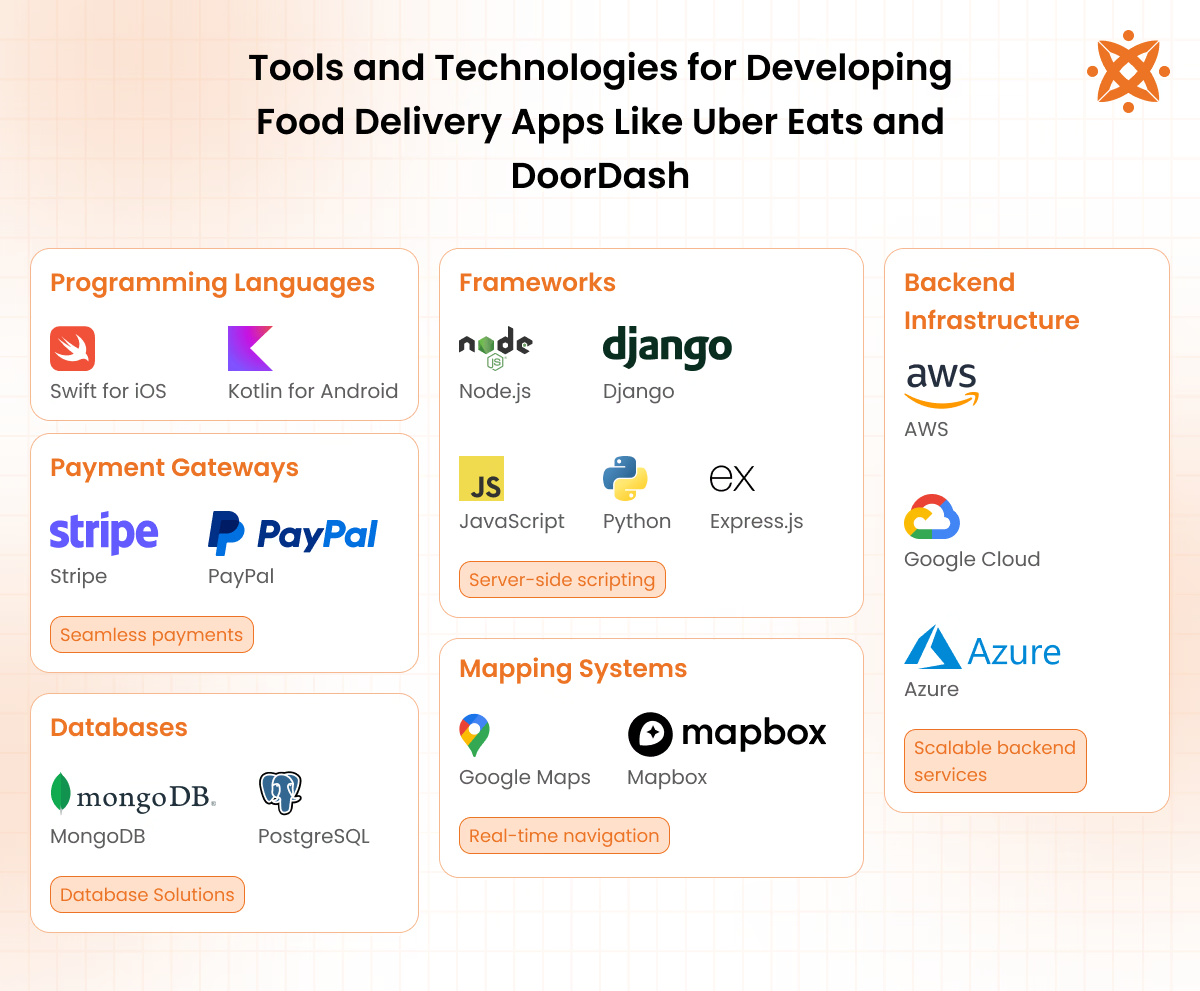
The tools and technology used in food delivery apps like Uber Eats and DoorDash development include tools for programming languages and frameworks, mapping technologies, and secure payment gateways. These technologies all work together to support real-time order tracking, UI/UX design, and reliable backend systems.
Programming Languages and Frameworks
Programming languages and frameworks form the backbone of front-end development, backend development, and cross-platform development frameworks, ensuring apps are functional and efficient.
Tools used in programming languages and frameworks include:
- Swift for iOS: A programming language used to build fast, efficient apps for Apple devices, offering native performance and rich features.
- Kotlin for Android: A preferred language for Android app development, known for its concise syntax and enhanced productivity.
- JavaScript or Python for backend development: JavaScript is widely used for interactive app components, while Python ensures efficient server-side operations.
- Node.js: A JavaScript runtime that supports scalable and fast server-side applications.
- Django: A Python-based framework that makes backend tasks like user authentication and database management simple.
- Express.js: A lightweight framework for Node.js, ideal for building flexible backend systems.
Mapping and Navigation Technologies
Mapping technologies ensure accurate real-time order tracking and optimized delivery routes. The tools used in mapping and navigation technologies include:
- Google Maps API: A tool for integrating geolocation, mapping, and navigation into apps with reliable accuracy.
- Mapbox: A customizable mapping platform used for unique location-based features and visualizations.
Payment Gateways and Security Tools
Payment gateways and security tools enable secure, fast, and reliable payment integration, ensuring user trust.
- Stripe: A versatile platform offering secure payment processing and easy integration.
- PayPal: A widely used payment gateway supporting online transactions.
- Braintree: Provides seamless payment solutions for credit cards and wallets.
- Encryption technologies: Ensure secure data transmission by protecting user information from cyber threats.
Backend Infrastructure and Database Solutions
Backend systems manage app functionality and data, ensuring scalability and efficiency.
- Cloud platforms (AWS, Google Cloud, or Microsoft Azure): Offer storage, computing power, and tools for scalable backend operations.
- Databases (MongoDB or PostgreSQL): MongoDB is ideal for handling large data volumes, while PostgreSQL ensures reliable relational database management.
These tools and technologies work together to deliver special features like real-time order tracking, efficient API integration, and cross-platform compatibility.
What Security Measures Are Essential For Food Delivery Apps?
The security measures that are essential for food delivery apps are listed below.
- Data Encryption: User information and payment details remain protected when data undergoes encryption in transit and at rest in all devices.
- Secure Authentication: Customer and driver accounts require strong passwords, two-factor authentication, and biometric login verification.
- Payment Security: Financial transactions stay safe through PCI-compliant payment gateways that prevent direct card storage on servers.
- Fraud Detection: Suspicious activities, including unusual orders, payments, and driver behaviour, get flagged through automated monitoring systems.
- API Security: App and backend server connections maintain protection via SSL certificates and token-based authentication protocols.
- Compliance Standards: User and restaurant data receive legal protection through GDPR compliance and local privacy regulation adherence.
- Regular Security Audits: Penetration testing and vulnerability assessments identify and resolve security gaps before data exposure occurs.
How Do I Choose A Reliable Food Delivery App Development Firm Near Me In The UK?
Choosing a reliable food delivery app development firm in the UK involves evaluating their experience, portfolio, and technical expertise.
Look for firms with proven experience in developing cross-platform apps with features like real-time order tracking, secure payment gateways, and push notifications.
A strong portfolio showcasing similar projects demonstrates the firm's ability to deliver high-quality apps tailored to specific business needs. Consider their use of modern technologies, such as UI/UX design tools and robust backend development practices, to ensure your app is scalable and efficient.
Transparent communication, adherence to timelines, and positive client reviews further indicate an app development firm’s reliability and professionalism.
What Is The Cost Of Developing A Food Delivery App Like Uber Eats And Door Dash?
The average cost of developing a food delivery app like Uber Eats or DoorDash ranges from £15,000 to £45,000, depending on the app's complexity, features, and platform compatibility. Several cost factors influence the total expense, including development stages, technology stack, and design elements.
The features and functionality significantly impact the cost. Basic features like user registration, menu browsing, and payment gateways cost between $10,000 and $15,000.
Advanced functionalities such as real-time order tracking, push notifications, and GPS integration add $15,000 to $30,000, especially for apps designed with cross-platform development frameworks.
The technology stack and platform choice also contribute to the overall expense. Developing for iOS or Android individually costs $15,000 to $25,000 per platform, while cross-platform development using frameworks like Flutter or React Native ranges from $20,000 to $35,000. Backend infrastructure, including cloud platforms and databases, costs an additional $10,000 to $25,000.
Lastly, the UI/UX design and testing phase adds $8,000 to $15,000. This step ensures the app is visually appealing, user-friendly, and free of bugs, ultimately enhancing user experience and retention.
Maintenance and updates post-launch also require a recurring cost of $5,000 to $10,000 annually, ensuring the app remains reliable and competitive.
What Marketing Strategies Are Effective For Promoting Food Delivery Apps?
The marketing strategies that are effective for promoting food delivery apps are social media campaigns, influencer partnerships, referral programs, and restaurant collaborations to build brand awareness. Social media advertising on Instagram and Facebook targets hungry audiences directly, while food influencers showcase the app's convenience and menu variety to their engaged followers, driving downloads.
Referral programs incentivise existing users to invite friends through discounts and credits, creating word-of-mouth growth and user retention. UK Businesses must launch an app with location-based marketing and user reviews to establish credibility and maximise market share against competitors.
How Do You Increase User Engagement In A Food Delivery App?
Increasing user engagement in a food delivery app involves implementing personal experiences, gamification elements, and leveraging geo-targeted promotions.
Personal user experience is achieved through AI-driven recommendations and marketing campaigns, which improve user satisfaction and conversion rates.
Gamification strategies, such as the use of interactive features and rewards, also make the ordering process more engaging and encourage repeat usage.
Geo-targeted promotions utilize location-based technology to offer timely and relevant deals, increasing the likelihood of user engagement.
How Do Food Delivery Apps Generate Revenue?
Food delivery apps generate revenue through commission fees charged to restaurants, ranging from 20-30% per order, and delivery fees collected from customers at checkout. Additional revenue streams include subscription memberships offering unlimited free delivery, restaurant advertising placements, and sponsored promotions from food brands seeking visibility within the app.
Premium features (priority delivery, restaurant partnerships, and in-app advertising) from third-party vendors diversify income sources and increase profit margins. Platforms that make money with mobile apps that have subscription services, ads, and data monetisation strategies to create revenue growth.
How to Start a Food Business from Home?
To start a food business from home, choose a suitable business model, comply with food safety regulations, set up your kitchen, create an online ordering system, and promote your business to attract customers.
1 Choose a Business Model. Select a home kitchen, cloud kitchen, meal kit, catering, bakery, or grocery delivery model based on your target market and budget.
2 Conduct Market Research. Identify customer demand, competitors, pricing, popular cuisines, and underserved locations before launching.
3 Register Your Business and Obtain Licences. Register your business, comply with local food safety regulations, and obtain the licences or permits required to operate legally.
4 Define Your Delivery Area. Choose delivery locations based on demand, delivery time, operating costs, and logistics coverage.
5 Create a Delivery-Friendly Menu. Develop a menu that is profitable, easy to prepare, and suitable for transport while minimising food waste.
6 Set Up Your Kitchen. Equip your kitchen with the appliances, storage, packaging materials, and food preparation equipment required for daily operations.
7 Build an Online Ordering System. Create a food delivery app or website that allows customers to browse the menu, place orders, make secure payments, and track deliveries.
8 Launch and Promote Your Business. Market your food business through local SEO, Google Business Profile, social media, online advertising, and customer reviews to attract orders.
What Is The Difference Between A Food Delivery App And A Grocery Shopping App?
The primary difference between a food delivery app and a grocery shopping app lies in its core services: food delivery apps facilitate the ordering and delivery of prepared meals from restaurants. In contrast, grocery shopping apps enable users to purchase raw ingredients and household essentials for home preparation.
This difference influences their design and functionality, with food delivery apps emphasizing features like menu browsing, real-time order tracking, and payment gateways. In contrast, grocery apps focus on product catalogs, inventory management, and bulk purchasing options.
Grocery shopping apps are designed to provide detailed product information and efficient navigation to facilitate the selection of multiple items, catering to users seeking convenience in their grocery shopping experience.