
Custom Android app development is the process of building and maintaining Android applications to meet requirements instead of using off-the-shelf solutions. Custom development helps startups in the UK improve and automate workflows and strengthen security. It uses native and cross-platform frameworks, frontend and backend languages, databases, and development tools to create applications.
Choosing the right development company requires evaluating technical expertise, portfolio quality, security standards, and long-term support to ensure project delivery. Businesses in London searching for end-to-end Android app development services benefit from solutions covering strategy, UI/UX design, testing, and ongoing maintenance.
What is a Custom Android App?
A custom Android app is a native application from the ground up using Kotlin (or Java) via Android Studio's SDK. The custom app is structured around a Model-View-ViewModel (MVVM) or Clean Architecture that separates the UI layer from the domain and data layers, with Jetpack components (Room and LiveData) handling state, persistence, and lifecycle management.
The Android app integrates with backend systems like Customer Relationship Management (CRM), Enterprise Resource Planning (ERP), and customises for hardware access, security protocols, or business logic because it is built API-first. The approach trades faster time-to-market for control over the functionality of the Android app.
What Are the Best Frameworks and Tools for Custom Android App Development?
The best frameworks and tools for Custom Android App Development are Native Custom Android App Development Frameworks, Frontend Custom Android App Development Frameworks, and Backend Custom Android Development Frameworks. They are important for creating efficient, scalable, and high-performing applications. These tools help you simplify the development process, improve app functionalities, and ensure impressive user experiences. The choice of frameworks depends on project requirements, programming languages, and platform compatibility.
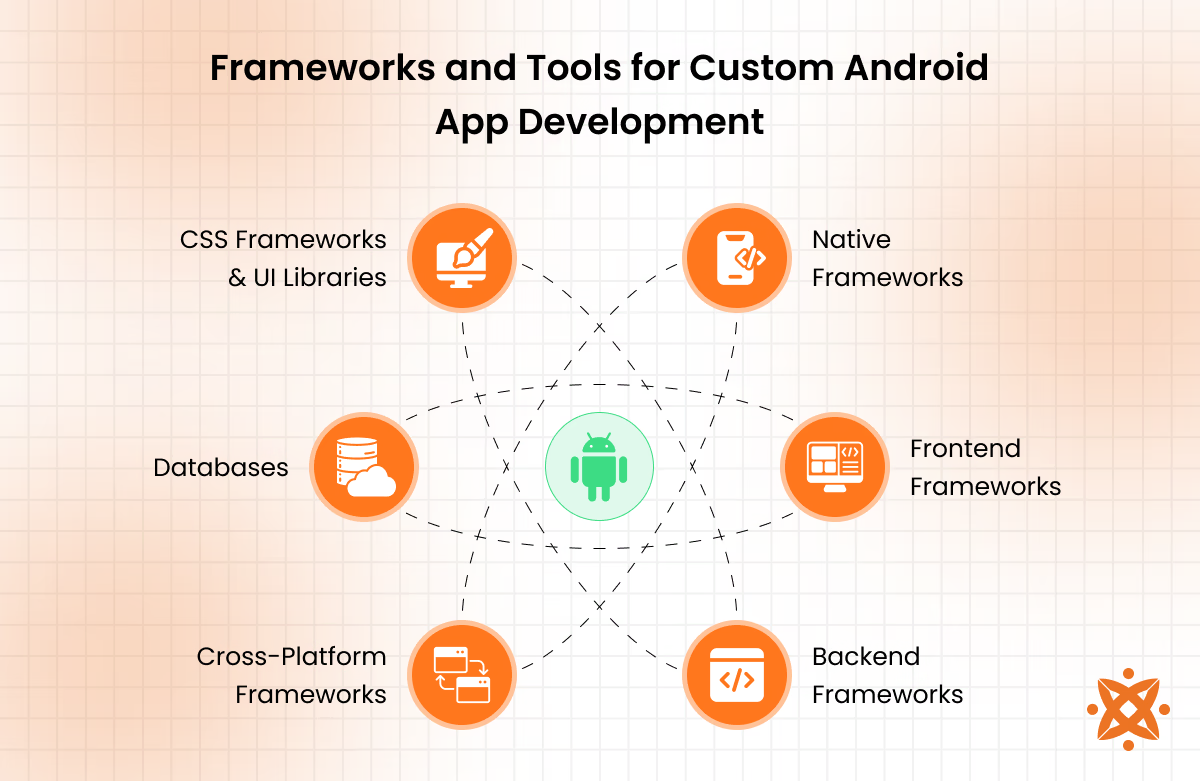
The best Frameworks and Tools for Custom Android App Development are as follows:
Native Custom Android App Development Frameworks
Native custom Android app development frameworks are a category of tools giving apps low-level access to system APIs, hardware drivers, and the Android Runtime (ART) for ahead-of-time bytecode execution. Android Studio, Google's official IDE built on IntelliJ IDEA with a Gradle-based build system, and Jetpack Compose are considered the best for Android development.
Native custom eliminates the overhead of cross-platform bridges, resulting in faster rendering, lower latency, and full support for platform-specific features (sensors and notifications). The direct SDK access enables tighter memory management and debugging precision unavailable in hybrid frameworks.
Frontend Custom Android App Development Frameworks
Frontend custom Android app development frameworks handle the presentation layer, rendering layouts and widgets that users interact with, and the app's backend logic. Material Components for Android remains the go-to choice for native builds since it is Google's own implementation of Material Design, ensuring consistent theming and accessibility.
Flutter and React Native are favoured for cross-platform UI work, using Dart's widget tree and React's virtual DOM to render near-native interfaces from a single codebase. SwiftUI is built for Apple's ecosystem, but it is referenced as the design frameworks that aim to match declarative syntax and tight system-level integration.
Backend Custom Android Development Frameworks
Backend custom Android development frameworks power the server-side layer that handles logic, data persistence, and authentication, communicating with the mobile client through REST or GraphQL endpoints. Firebase Cloud Functions is the top pick for Android backends because it is a serverless FaaS model, deploying Node.js or Python code that auto-scales without infrastructure.
Spring Boot and Django remain strong alternatives for teams needing full control over server architecture, using MVC patterns and ORM-based database management for more complex, enterprise systems.
Cross-Platform Custom Android App Development Frameworks
Cross-platform custom Android app development frameworks let teams write a single codebase. Flutter is frequently ranked as the strongest option because it uses Dart with the Skia rendering engine to draw its own UI directly, bypassing native platform widgets entirely for pixel-consistent output and hot-reload iteration.
React Native bridges JavaScript to native components for a closer-to-native feel, and Kotlin Multiplatform Mobile takes a hybrid approach, sharing only the logic layer while keeping UI fully native on each platform.
Custom Android App Development Databases
Custom Android app development databases manage how an app stores, queries, and persists data, locally on-device or synced through the cloud. Room is regarded as the top choice for local storage because it is Google's own abstraction layer over SQLite, adding compile-time query validation, LiveData integration, and built-in migration handling that raw SQLite lacks.
Firebase Firestore is preferred for real-time, multi-device apps because its NoSQL document model auto-scales and pushes data changes instantly via listeners, and Realm offers an alternative with zero-copy reads for apps prioritising raw local performance.
Custom Android App Development CSS Frameworks and UI Libraries
Custom Android app development, CSS Frameworks and UI Libraries style and animate the interface layer. Tailwind CSS is considered the top pick for hybrid Android UI because the utility-first framework applies styling through class names instead of custom stylesheets, removing CSS bloat and speeding up responsive design.
Bootstrap remains a solid choice for web-based Android views needing pre-built responsive grids, and libraries (Lottie and Shimmer) handle motion design, rendering vector-based JSON animations and skeleton-loading placeholders that native XML or Compose do not replicate as efficiently.
What Programming Languages Are Used for Custom Android App Development?
Programming languages used for custom Android app development are Java, Kotlin, Dart, C#, Python, and Ruby. They are important for building functional, high-performing, and scalable applications. Depending on project requirements and desired functionalities, different languages cater to front-end and back-end development.
Programming languages used for Custom Android App Development are as follows:
Frontend Custom Android App Development Programming Languages
Frontend custom Android app development programming languages refer to the coding languages used to build an app's visual, user-facing layer (Kotlin, Dart, and C#). The languages are used in Android development because each offers strong typing and modern language features suited for building responsive, interactive UIs.
The frontends are useful for speeding up development through concise syntax, built-in null safety, and reduced boilerplate code compared to older languages. The main advantage is faster, safer coding, but the trade-off is a steeper learning curve and smaller community support compared to more established languages like Java.
Backend Custom Android App Development Programming Languages
Backend custom Android app development programming languages refer to the coding languages used to build the server-side logic that an Android app communicates with (Java, Python, and JavaScript). The backends are used in Android development because each offers frameworks and libraries suited for handling data processing.
The languages are important for managing tasks, from database queries to third-party integrations, without touching the app's client-side code. It has a stable performance, but the trade-off is added complexity in managing separate codebases compared to simpler, all-in-one solutions.
How to Make a Custom Android App?
To make a custom Android app, you must follow a structured development process that includes planning, designing, coding, testing, and deployment. The process begins with defining the app's purpose and target audience and selecting the right technology stack and development framework.
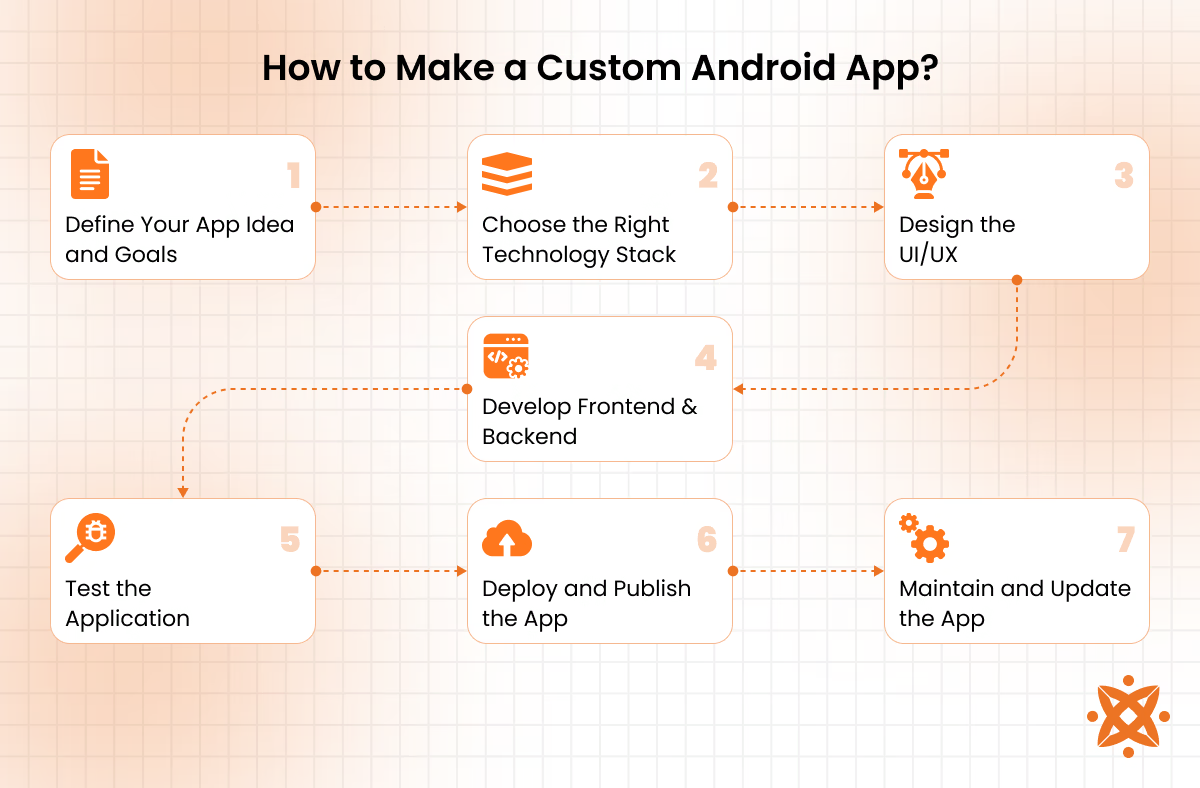
Once the foundational elements are established, you write the application code, integrate backend services, and optimise the user interface for smart functionality. After rigorous testing and debugging, the app is deployed to the Google Play Store or distributed through other channels, ensuring continuous updates and maintenance.
To make a custom Android app, the steps are followed:
Step 1: Define Your App Idea and Goals
Clearly outline the app's purpose, target audience, and key functionalities. Conduct market research to understand competitors and user needs, ensuring your app offers unique value.
Step 2: Choose the Right Technology Stack
Select appropriate programming languages (Java, Kotlin, or Flutter), development frameworks, and backend services based on the app's complexity and scalability requirements.
Step 3: Design the User Interface (UI) and User Experience (UX)
Create wireframes and prototypes to visualise the app's layout. Ensure the design is intuitive, user-friendly, and aligns with modern UI/UX best practices.
Step 4: Develop the Frontend and Backend
Write the application's frontend code while developing backend services for data storage, authentication, and business logic. Use APIs for smooth integration with external services.
Step 5: Test the Application
Conduct functional, performance, and security testing to identify and fix bugs. Use emulators and real devices to ensure compatibility across different Android versions and screen sizes.
Step 6: Deploy and Publish the App
Submit the app to the Google Play Store or distribute it through enterprise channels. Ensure compliance with Play Store policies and optimise the app listing for better visibility.
Step 7: Maintain and Update the App
Regularly update the app to fix bugs, improve performance, and add new features based on user feedback. Monitor analytics to enhance user engagement and retention.
What are the Best Custom Android App Development Software?
The best Custom Android App Development Software are listed below.
- Android Studio: Google's official IDE built on IntelliJ IDEA integrates Kotlin, Jetpack Compose, and a Gradle-based build system for native app coding, testing, and profiling.
- Firebase: A backend-as-a-service platform provides authentication, Cloud Firestore, and serverless Cloud Functions for real-time data sync and backend logic.
- Flutter: Google's open-source SDK compiles a single Dart codebase into rendered UIs for Android, iOS, and beyond via the Skia engine.
- GitHub: A version control platform that manages source code, branching, and pull requests for collaborative Android development in teams.
- Gradle: A build automation system handles dependency resolution, compilation, and APK or AAB packaging for Android projects.
- LeakCanary: A memory leak detection library flags retained object references at runtime to prevent app slowdowns and crashes.
- Espresso: A UI testing framework automates interaction simulations to verify Android app behaviour across screens and components.
What Are the Best Practices for Custom Android App Development?
The best practices for custom Android app development are ensuring a user-centric design, optimising performance, and maintaining strong security standards. Following these practices helps create high-quality, scalable applications that provide an integrated user experience while adhering to industry standards. Each step contributes to a reliable and well-performing app, from efficient coding techniques to rigorous testing.
The following are the best practices for custom Android app development:
- Focus on User-Centric Design:A well-designed app should have an intuitive interface, smooth navigation, and visually appealing elements. Prioritising UI/UX design improves user engagement and retention, ensuring that the app meets the expectations of its target audience.
- Optimize for Performance and Battery Efficiency:Efficient coding, memory management, and background process optimisation are important for delivering a fast and responsive app. Reducing unnecessary network calls and optimising resource usage helps improve performance and battery life.
- Ensure Security and Data Protection:Implementing encryption, secure authentication methods, and compliance with data privacy regulations protect user information. Avoiding hardcoded credentials and using secure APIs prevents security breaches and unauthorised access.
- Use Scalable Backend Infrastructure:The right backend technology ensures effortless data management and app scalability. Cloud services like Firebase or AWS allow for real-time database updates and efficiently handle increasing user demand.
- Follow Android Development Guidelines:Adhering to Google's Android development guidelines ensures compatibility across different devices and Android versions. Following Material Design principles also maintains a consistent and modern app appearance.
- Implement Thorough Testing:Regular testing, involving unit testing, integration testing, and user testing, helps identify and fix bugs before launch. Automated testing tools like Espresso or UI Automator improve app stability and performance.
- Regularly Update and Maintain the App:Continuous updates help fix bugs, enhance security, and introduce new features based on user feedback. Monitoring performance analytics ensures the app remains optimised and relevant over time.
Can You Develop Custom Android Apps with AI like ChatGPT?
Yes, you can develop custom Android apps with AI like ChatGPT. AI-powered tools assist in code generation, debugging, and automating repetitive tasks, significantly speeding up development. Platforms like OpenAI's GPT models generate functional code snippets, suggest UI designs, and even create conversational AI features for apps. However, AI cannot replace human expertise entirely, as it lacks deep contextual understanding and creative problem-solving abilities. You must still refine and optimise AI-generated code to ensure performance, security, and scalability. AI is a valuable assistant rather than a complete replacement for custom Android app development.
What Are the Trends in Custom Android App Development?
The top trends in custom Android app development include AI-powered applications, 5G integration, and blockchain-based security solutions.These innovations reshape how Android apps function, improving performance, security, and user experience. As technology evolves, businesses must adopt these trends to stay competitive and deliver cutting-edge applications to their users.
The top trends in custom Android app development are as follows:
- AI and Machine Learning Integration:Artificial intelligence and machine learning transform Android apps by enabling personalised user experiences, predictive analytics, and automation. These technologies, from AI-driven chatbots to advanced recommendation systems, enhance engagement and efficiency in mobile applications.
- 5G-Optimized Applications:With the rollout of 5G networks, Android apps are becoming faster, more responsive, and capable of handling high-definition streaming, AR/VR experiences, and real-time data processing. Developers are optimising apps to utilise 5G speeds, reducing latency and improving overall performance.
- Blockchain for Security and Transparency:Blockchain technology is increasingly used in custom Android app development for securing transactions, data encryption, and decentralised applications (DApps). It ensures transparency, prevents data breaches, and enhances trust in finance, healthcare, and e-commerce apps.
- Internet of Things (IoT) Integration:IoT-enabled Android apps are gaining traction, allowing users to control smart home devices, wearables, and industrial sensors. These apps improve automation and real-time monitoring, making them important for connected ecosystems.
- Cross-Platform Development with Flutter and Kotlin Multiplatform:As businesses aim to reach wider audiences, cross-platform development frameworks like Flutter and Kotlin Multiplatform are becoming more popular. These tools enable you to create apps for Android and iOS with a single codebase, reducing development time and costs.
- Augmented Reality (AR) and Virtual Reality (VR) Applications:AR and VR technologies are revolutionising gaming, e-commerce, and education apps by providing immersive experiences. These features, from virtual shopping to interactive learning, enhance user engagement and innovation in custom Android app development.
How Much does it Cost to Develop a Custom Android App?
It costs £8,000 to £35,000 to develop a custom Android app in the UK, with basic versions landing at the lower end and more advanced builds pushing toward the higher figure. The final price depends on where the developers are based, how big the team is, and how much custom backend work is needed. The Android app development cost rises depending on the industry, with checkout features, alert systems, and extra security work adding to the total.
How to Choose the Right Custom Android App Development Company?
To choose the right Custom Android App Development Company, follow the five steps listed below.
- Review Portfolio and Past Projects. Examine previous Android apps to assess design quality and industry relevance before making contact.
- Verify Technical Expertise in Kotlin and Java. Confirm the team has hands-on experience with native Android languages and modern architecture patterns.
- Check Client Reviews and Testimonials. Validate the company's reliability through platforms (Clutch, GoodFirms, or Google Reviews).
- Compare Pricing Models and Contracts. Request detailed quotes covering discovery, design, and development phases to avoid hidden costs.
- Request a Security and Compliance Audit. Confirm the company follows GDPR standards and implements encryption protocols for user data.
Choosing the right development partner can significantly influence your app's long-term success. Businesses planning an Android app must consider Intelivita UK because it has delivered over 250 mobile apps and employs Android specialists skilled in Kotlin, Java, and Jetpack Compose. It has built award-winning Android solutions, including a taxi app recognised by the UK Prime Minister and featured by BBC News.
What is the Difference Between Custom Android App Development and Android App Development?
The difference between custom Android app development and Android app development is shown in the table below.
| Aspect | Custom Android App Development | Android App Development |
|---|---|---|
| Definition | Builds Android applications tailored to specific business goals, workflows, and requirements. | Develops Android applications for general consumer or business use. |
| Focus | Delivers custom features, integrations, and user experiences that align with business objectives. | Focuses on creating functional Android applications using standard development practices. |
| Target Users | Businesses and organisations that require unique, purpose-built mobile solutions. | Startups, enterprises, developers, and consumers with general Android app requirements. |
| Development Approach | Uses fully customised architecture, features, and workflows based on business needs. | Can be developed using native, cross-platform, or hybrid technologies. |
| UI/UX Design | Features brand-specific interfaces designed for a tailored user experience. | Uses standard Android design principles with optional customisation. |
| Scalability | Designed to support future business growth, feature expansion, and increased user demand. | Scalability depends on the application's architecture and implementation. |
| Development Time | Typically requires more time due to custom planning, design, and feature development. | Development timelines vary depending on the application's scope and complexity. |
| Maintenance | Includes ongoing updates, performance improvements, and feature enhancements. | Focuses on regular updates, bug fixes, and compatibility improvements. |
| Performance Optimisation | Optimised specifically for business processes, user requirements, and operational efficiency. | Optimised using Android development best practices and platform guidelines. |
The comparison above highlights how each approach has different development needs and project priorities. Selecting the right solution depends on business goals, expected growth, and required features, making careful planning important for Android app development.