What Is An App?

Co-Founder
An app is a software programme used to perform tasks on smartphones and computers. Adults use apps for communication, shopping, and entertainment. Users are asking, “What is a software app?” The answer is simple. Apps are built using user interface, source code, databases, and API endpoints, and extent types from mobile and desktop to web, PWAs, serving users in healthcare and e-commerce.
Development follows a process of planning, design, coding, testing, and deployment, with costs ranging from £10,000 to £40,000 for most projects, rising to £100,000 for complex cross-platform builds. Technical expertise, industry portfolio, communication, post-launch support, and pricing transparency are the considerations when choosing a development partner. Our app development services cover it all, providing solutions with costs from concept through to launch.
How Do Apps Work?
Apps work through a frontend interface and a backend server connected via APIs. The frontend displays what users see on their screen, while the backend stores data and processes requests in real time. Banking apps send payment requests to servers that verify credentials and execute transactions. Retail UK businesses use inventory databases linked to their shop apps, so stock levels update automatically when customers purchase items.
E-commerce and delivery services rely on the same system. User actions on the app trigger backend calculations that manage orders, payments, and logistics. All daily tasks are used through secure apps that connect to deliver the results users expect.
How Do Android Apps Differ from iOS Apps?
Android apps are built using Java or Kotlin in Android Studio, targeting device manufacturers (Samsung, Google, OnePlus), while iOS apps use Swift or Objective-C in Xcode exclusively for Apple hardware. Android apps are distributed through the Google Play Store with less stringent review processes. iOS apps require Apple's approval before reaching the Apple App Store, affecting time-to-market and release control.
Android developers must optimise for fragmentation in screen sizes, RAM configurations, and OS versions, while iOS developers work with standardised hardware specifications and consistent OS updates. Material Design governs Android's visual language and interaction patterns, while iOS follows Apple's Human Interface Guidelines, with iOS vs Android differences resulting in different user experiences and development workflows.
What Are The Key Components Of An App?
The key components of an app are the user interface, source code, databases, API endpoints, modules, libraries, configuration files, push notifications, analytics trackers, and theapp icon. These components interact with each other to make a functional app.
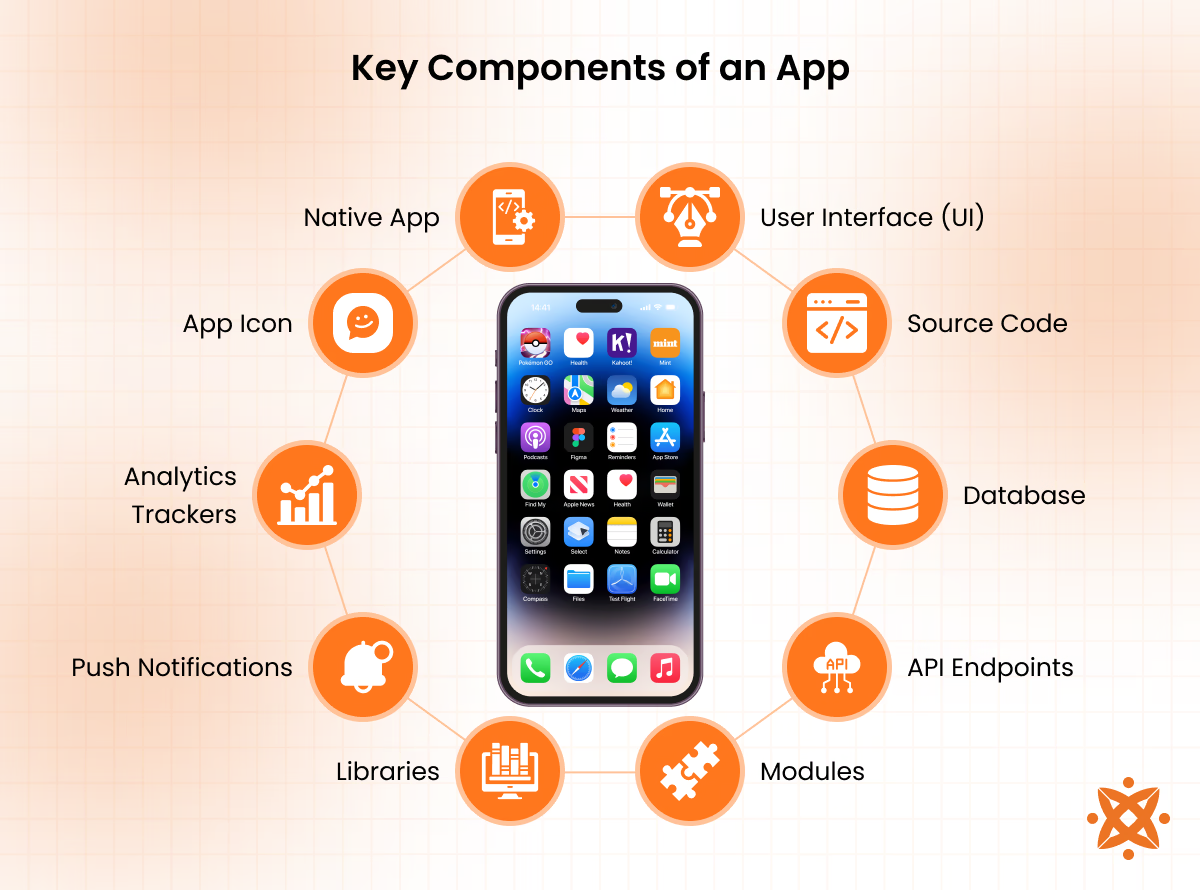
The key components of an app are explained below:
- User Interface (UI): The UI is the visual and interactive part of the app that users engage with directly. It includes screens, buttons, and layouts designed to make navigation intuitive and efficient.
- Source Code: The source code is the foundation of the app, written in programming languages like Java, Python, or Swift. It dictates the app's behavior and enables all its features to function properly.
- Database: Databases store and manage the app's data, such as user profiles, settings, or transaction records. They ensure that information is organized and accessible whenever needed.
- API Endpoints: These are interfaces that allow the app to communicate with external systems, such as servers or third-party services. For example, a weather app retrieves real-time forecasts using API endpoints.
- Modules: Modules are individual sections of code designed to perform specific tasks within the app. They keep the app organized and allow for easier updates and maintenance.
- Libraries: Libraries are pre-written code collections that developers use to add functionality without writing code from scratch. They speed up development and reduce errors.
- Configuration Files: These files store app settings and preferences, ensuring that the app behaves correctly in different environments, such as development or production.
- Push Notifications: Push notifications are messages sent directly to users' devices to provide updates, alerts, or promotions, keeping them engaged with the app.
- Analytics Trackers: Analytics trackers collect data on user behavior, app performance, and usage patterns. This information helps developers improve the app over time.
- App Icon: The app icon is the graphical symbol users see on their devices. It serves as the app's first impression and helps users identify it quickly.
What Are The Different Types Of Apps?
The different types of apps include mobile, desktop, web, and Progressive Web Apps (PWAs), each serving different user needs, from on-the-go smartphone experiences to full-featured browser-based tools accessible on any device.
- Mobile Apps: Software built for Android and iOS devices, providing device-specific features and touch-optimised experiences.
- Desktop Apps: Applications installed on Windows, macOS, or Linux computers for productivity and resource-intensive tasks.
- Web Apps: Browser-based applications accessed over the internet without requiring installation on a device.
- Progressive Web Apps (PWAs): Web applications that provide app-like experiences with offline support, push notifications, and fast performance.
- IoT Device Apps: Applications that connect with internet-enabled devices to monitor, automate, and control hardware remotely.
- Legacy Apps: Existing applications built on older technologies that continue supporting business processes despite modern alternatives.
What is the Difference Between Mobile Apps and Web Apps?
Mobile apps are downloaded from app stores and installed on devices, working offline and accessing device features (GPS and cameras), while web apps run through browsers and need the internet to function. Native apps load 1-2 seconds faster than web apps due to local installation. Both use the same backend servers and databases to store data, and information syncs in the platforms automatically.
Banks build native mobile apps for secure offline transactions and fingerprint login, achieving 0.5-second response times for payments, while the online shops create web apps to shop on any device without downloading anything, with loading in 2-4 seconds depending on server speed. Food delivery services rely on mobile apps for location tracking and push notifications with instant updates, while project management tools use web apps for teams accessing work (desktops, tablets, and phones) without installation.
What Are the Application Uses?
The uses of the application are listed below.
- Word Processing and Document Creation: Microsoft Word and Google Docs support drafting, formatting, and sharing documents in personal and workflow environments.
- Spreadsheet and Data Management: Microsoft Excel and Google Sheets handle numerical data, financial modelling, and record-keeping for organisations.
- Communication and Messaging: Slack, Zoom, and Microsoft Teams facilitate instant messaging, video conferencing, and team collaboration in real time.
- Customer Relationship Management (CRM): Salesforce centralise client data, sales pipelines, and customer interactions to improve retention and service delivery.
- Accounting and Financial Management: QuickBooks and Xero manage invoicing, payroll, tax reporting, and cash flow monitoring for businesses of all sizes.
- Media Editing and Content Creation: Adobe Photoshop, Premiere Pro, and Final Cut Pro support image editing, video production, and multimedia publishing.
- Project Management: Asana and Jira organise tasks, track progress, and manage team capacity in complex or multi-phase projects.
- E-Learning and Training: Moodle, Coursera, and Google Classroom deliver learning, assessments, and certification programmes to students and professionals.
- Enterprise Resource Planning (ERP): ERP systems (SAP and Oracle) integrate business functions, from inventory and procurement to HR and reporting, covering every core app use in an organisation.
What are the popular apps in the UK?
The popular apps in the UK are listed below.
- Citymapper: Citymapper is a transport app where users plan journeys in Tube, buses, rail, walking and cycling routes in major UK cities.
- TfL Go: London residents rely on TfL Go to access live Underground updates, fare information, and route planning for public transport services.
- Trainline: Rail passengers use Trainline to purchase train tickets, check live times, and manage mobile travel passes across British Railways.
- Just Eat: Just Eat connects UK customers directly to takeaways and independent restaurants with integrated payment functionality.
- Deliveroo: Urban diners access restaurant meals, groceries, and premium delivery options through Deliveroo in multiple UK locations.
- Rightmove: Rightmove enables property seekers to browse housing listings, manage bookings, and track availability in the UK rental and purchase markets.
- Barclays: UK account holders aged 16+ manage current accounts and Barclaycard transactions securely via Barclays mobile banking.
- Nectar: Nectar rewards shoppers who collect loyalty points in over 900 brands, including Argos and Esso, converting rewards into Avios with British Airways.
How To Develop An App?
To develop an app, follow the six steps listed below.
- Set a Clear App Concept. Define the purpose, target audience, and problem the application addresses before moving into any technical planning.
- Research the Market and Competitors. Study existing apps in the same space to identify gaps, validate demand, and shape a focused MVP scope.
- Wireframe and Prototype the Design. Build low-fidelity wireframes and prototypes in Figma or Adobe XD to map out user flows and interface structure.
- Write the Code and Build the Architecture. Develop front-end and back-end components using frameworks (React Native, Flutter, Swift, or Kotlin) depending on the target platform.
- Run QA Testing Across Devices. Execute functional, performance, and usability tests on multiple screen sizes and operating systems to catch bugs before release.
- Submit, Launch, and Monitor Performance. Deploy to the Google Play Store or Apple App Store and track user feedback and analytics. Developers who understand how to develop an app treat post-launch monitoring as an ongoing development cycle.
Can You Make Money With Apps?
Yes, you can make money with apps through various monetization strategies such as in-app purchases, subscriptions, advertising, and premium downloads.
In-app purchases allow users to buy virtual goods or features, while subscription models provide recurring revenue for services like streaming or fitness. Advertising integrates revenue through display or video ads, and premium apps charge users upfront for access.
According to a report by Sensor Tower in 2022, mobile apps generated over £300 billion globally, with gaming apps accounting for the majority of revenue, followed by subscription-based apps like Netflix and Spotify.
Businesses and developers leverage these strategies to generate consistent income from app platforms.
What Factors Affect App Development?
The factors affecting app development are listed below.
- Platform: The app targets iOS, Android, web, or multiple platforms, which impacts the tools, languages, and resources required.
- Features and Complexity: The scope of basic interfaces to real-time data, payments, or AI integration determines development time and cost.
- UI/UX Design: A well-structured design requires research, prototyping, and testing effort.
- Backend Infrastructure: Server-side architecture, databases, and APIs must be planned to support the app's core functionality.
- Security and Compliance: Meeting data protection regulations (GDPR or HIPAA) adds legal requirements to the build process.
- Team and Expertise: The size, skill set, and location of the team affect pace and budget.
- Testing and QA: Quality assurance in devices is important before and after launch.
- Maintenance and Updates: Ongoing bug fixes, OS compatibility updates, and feature improvements extend the development lifecycle over the initial release.
Can I Build An App With Ai?
Yes, you can build an app with AI by integrating machine learning models and AI algorithms into its functionality.
AI-powered apps perform tasks like natural language processing, image recognition, and predictive analytics using frameworks like TensorFlow, PyTorch, or OpenAI APIs.
These technologies enable features such as chatbots, individualized recommendations, and intelligent automation, making apps more interactive and efficient.
Can I Build An App With Python?
Yes, you can build an app with Python, as it is a versatile programming language widely used for web, mobile, and desktop app development.
Frameworks like Flask, Django, and Kivy simplify the development process, allowing developers to create robust apps with efficient backend systems and interactive interfaces.
Python's simplicity and extensive libraries make it a popular choice for apps requiring data analysis, machine learning, or automation.
Yes, you can build an app with JavaScript, as it is a core language for web, mobile, and desktop app development.
Frameworks like React Native, Node.js, and Electron allow developers to create versatile apps, ranging from responsive web applications to cross-platform mobile and desktop apps.
JavaScript's widespread use and adaptability make it a preferred choice for building interactive, real-time, and scalable applications.
Can I Build An App With Kotlin?
Yes, you can build an app with Kotlin, a modern programming language designed specifically for Android app development.
Known for its concise syntax and compatibility with Java, Kotlin enables developers to create robust and efficient apps with fewer lines of code.
Its integration with Android Studio and growing ecosystem makes it a popular choice for building high-performance mobile applications.
Can I Build An App With React Native?
Yes, you can build an app with React Native, a popular framework for creating cross-platform mobile applications using a single JavaScript codebase.
React Native allows developers to build apps for iOS and Android with native-like performance and access to device features.
Its reusable components and extensive community support make it a reliable choice for efficient and scalable app development.
Can I Build An App With Flutter?
Yes, you can build an app with Flutter, an open-source UI toolkit developed by Google for creating cross-platform applications.
Flutter uses a single codebase written in Dart, allowing developers to build apps for iOS, Android, web, and desktop platforms.
Its rich set of pre-built widgets and tools provides high performance and a consistent user experience across devices.
Should I Build A Native Or Cross-Platform App?
The choice to build a native or cross-platform app depends on your goals, budget, and target audience. Native apps are developed for specific platforms like iOS or Android, offering better performance and full access to device features, but they are more expensive and time-consuming to develop.
Cross-platform apps use frameworks like Flutter or React Native to create a single codebase that works on multiple platforms, reducing development time and costs but potentially compromising performance.
According to a report by Statista, 60% of businesses opt for cross-platform development to save resources, while those prioritizing performance, such as gaming or enterprise apps, choose native solutions.
What Is The Cost Of Developing An App?
The cost of developing an app ranges from £10,000 to £40,000, with more complex builds exceeding that figure. Key cost factors include app platform choice, team expertise, third-party integrations, and GDPR compliance. Android and iOS app development each start from £8,000 to £12,000, while cross-platform development ranges from £100,000 to £150,000, covering platforms in a single build.
How To Choose An App Development Company In The UK?
To choose an app development company in the UK, start by evaluating their experience, portfolio, and expertise in creating apps similar to your project.
Look for companies with a proven track record in your industry and ensure they have experience working with the platforms and technologies you require, such as iOS, Android, or cross-platform frameworks like React Native or Flutter.
Checking client reviews and testimonials provides valuable insights into their professionalism and ability to meet deadlines.
Additionally, consider their communication process and post-launch support services. A reliable company maintains transparency throughout development and offers maintenance services to ensure your app remains functional and up-to-date.
Cost is another factor—compare quotes and assess whether the pricing aligns with the quality of services offered. All these factors help you find the best app development company in the UK.
What Is The Difference Between An App And A Website?
The difference between an app and a website is that an app is software installed on a device, such as a smartphone or computer, while a website is accessed through a browser and does not require installation.
Apps are designed to use a device's hardware, like GPS or cameras, and function offline or online, depending on their design. Websites, on the other hand, rely entirely on internet connectivity and are built using web technologies like HTML, CSS, and JavaScript.
According to a study by Statista published in 2022, mobile apps accounted for 70% of digital media time, showing their role in offering device-specific functionalities. In contrast, websites remain more versatile for accessing content across various devices without installation.
What Is The Difference Between An App And Software?
The difference between an app and software is that an app is a specific type of software designed to perform focused tasks on a particular platform or device, whereas software is a broader term covering all computer programs, including operating systems, drivers, and utilities.
Apps, such as messaging or gaming applications, are user-facing and built for interaction. At the same time, other software types, like databases or system utilities, operate in the background to support hardware or other programs.
According to a report by Techopedia, apps make up only a subset of the software landscape designed to meet specific user needs. In contrast, software covers a vast spectrum of functionalities supporting digital infrastructure.
What Is The Difference Between An App And A Program?
The difference between an app and a program is that an app refers to a specific type of program designed for end-user tasks, while a program is a general term for any set of instructions executed by a computer.
Apps are lightweight, task-oriented, and built for direct user interaction, such as gaming or social media. In contrast, programs include broader system-level operations, like compilers or operating systems, which support other software.
A study by the Computer Science Department at Stanford University explains that while all apps are programs, not all programs are considered apps, as programs serve a wider range of technical and operational purposes.