10 Main Components of a Website

Co-Founder
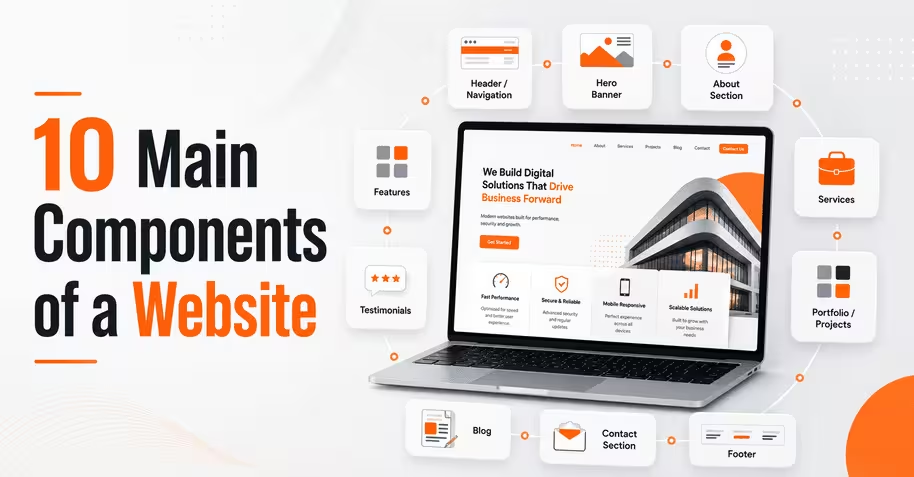
The ten main components of a website include domain name, web hosting, and homepage, each working with the other pieces to form a functioning site for British. Navigation menus and web pages make content findable and give visitors a path to complete an action, while CTA buttons and contact forms convert that traffic into leads. It is what keeps the components of website usable.
Hosting and optimised content keep pages loading fast, while SSL certificates and regular software patching close off the entry points attackers exploit, a standard UK startups now expect as part of GDPR compliance. It covers performance and protection in every one of the elements of a website. A CMS ties everything together on the backend, letting a business publish, edit, and organise the parts of a web page without needing to touch raw code for every update.
The 10 main components of a website are listed below.
- Domain Name
- Web Hosting
- Homepage
- Navigation Menu
- Web Pages
- Content (Text, Images, Video)
- Call-to-Action (CTA) Buttons
- Contact Forms
- Footer
- Content Management System (CMS)
1. Domain Name
A domain name is one of the main components of a website, functioning as the alphanumeric string through the Domain Name System (DNS) protocol to a server's IP address. A domain name lets browsers, email clients, and DNS resolvers route traffic to the correct server without users memorising raw IP strings.
The .com top-level domain (TLD) still leads global usage with 161.0 million active registrations as of December 31, 2025, according to the research titled "The Domain Name Industry Brief Quarterly Report Q4 2025" by Centralized Zone Data Service, 2025. The domain anchors WHOIS registration, SSL certificate validation, and nameserver delegation, which affect crawlability, trademark exposure, and long-term SEO equity, so securing a domain name early in development prevents zone conflicts.
2. Web Hosting
Web Hosting is a service that rents server space and computing resources (storage, bandwidth, RAM, and CPU cores). Website files and databases remain accessible online through HTTP/HTTPS requests. Hosting delivers website content from always-on servers instead of a local computer, allowing visitors to access the same site at any time while supporting email and web applications.
Web hosting is important because plan type, server performance, and uptime affect website availability, loading speed, search engine crawling, user experience (UX), and operations, with the common 99.9% uptime guarantee still allowing nearly 8 hours and 45 minutes of downtime per year. Sites start with shared web hosting for affordability before upgrading to VPS or cloud hosting as traffic, storage, and resource requirements increase.
3. Homepage
Homepage is the main landing template with a site's information, navigation, hero statement, and above-the-fold calls to action (CTA) into one entry point. Visitors form a judgment within roughly 50 milliseconds of a page rendering, according to the research titled "Attention Web Designers: You Have 50 Milliseconds to Make a Good First Impression" by Gitte Lindgaard et al.
The assessment of the homepage carries into time and bounce rate, so layout hierarchy, load speed, and clarity determine if a visitor scrolls or exits immediately. Site structure routes the highest percentage of first-touch traffic through the single homepage component, making the template form site engagement metrics.
4. Navigation Menu
A navigation menu is a website interface element that groups primary, dropdown, and link items into a hierarchy, allowing users and crawlers to move between pages. Menu exposes the information through labels and link groupings that reduce depth and improve content discoverability.
Visible navigation outperforms hidden or hamburger-only menus on desktop, with users engaging visible menus in 48% of tasks compared with 27% for hidden menus, reducing task completion time while improving session duration and usability. The navigation menu serves as the pathway connecting website sections, helping visitors locate information while strengthening internal linking and pages.
5. Web Pages
Web pages are HTML documents that have been assigned a unique URL, meta title, and directory path that are crawled and indexed separately within a domain's site structure. Pages break a site into units to make each page target a search query, service, or product without competing against other pages on the same domain.
The web pages show in traffic distribution data, where the top 1% of pages on a site capture roughly 80% of all organic visits while the bottom 80% generate under 0.5%, proving that page-level structure drives visibility more than domain authority alone. Header hierarchy (H1-H3), internal linking, and indexation status determine if web pages convert crawl budget into actual search rankings.
6. Content (Text, Images, Video)
Content that has the text, images, and video embedded within a page's HTML body, structured through header tags, alt attributes, and schema markup that parse for signals. The human brain processes information 60,000 times faster than plain text, which explains why image- and video-rich pages tend to hold attention longer than dense paragraphs alone.
Sites embedding video report an average 4.8% conversion rate versus 2.9% for text-only pages, tying media format to time, and metrics tracked in analytics platforms. Balancing copy, image compression, and native video hosting within thecontent (text, images, video)keeps page weight low while sustaining the multimedia mix that pushes conversions.
7. Call-to-Action (CTA) Buttons
Call-to-Action (CTA) buttons are clickable interface elements, coded as <button> or anchor tags with tracked event listeners, placed to trigger a conversion action (a purchase, signup, or form submission). Above-the-fold CTA placement outperforms below-the-fold placement by 304%, and centred buttons draw up to 682% more clicks than left-aligned ones, based on Conversion-Rate-Optimization (CRO) testing data.
Reducing a page to a single CTA, instead of competing buttons, has been shown to lift conversions by 266%, while contrasting button colours alone shift click-through rates by 21% in A/B split tests. Button copy, contrast ratio, and viewport placement of the Call-to-Action (CTA) buttons determine if a page's traffic converts or exits without engaging.
8. Contact Forms
Contact forms are input fields with text, email, dropdown, and submit elements wrapped in HTML <form> tags that route visitor data to a server-side script or CRM via POST requests. Contact forms average just 4 fields yet convert at only 1%, the lowest rate among all form types, while lead-generation forms with 11 fields convert at 17%, showing field count alone does not dictate performance.
Decreasing an 11-field form to 4 fields lifted submissions by 120% in one Imaginary Landscape case study, but field labelling, input validation, and spam filtering (CAPTCHA, honeypot fields) matter as length. Clear field labels, mobile-responsive input sizing, and minimal required fields on contact forms reduce abandonment and route qualified leads into a startup’s CRM pipeline.
9. Footer
The footer is the block at the bottom of every template, holding sitemap links, legal disclosures, and navigation that stays constant in all page loads. 72% place social media icons in the section rather than the header, since footer placement keeps visitors on-site longer before routing them to external platforms.
Footer content has copyright notices, privacy policy links, contact details, and Name, Address, Phone (NAP) data, and feeds crawlable internal links that search engines use to map site hierarchy and improve trust signals. Icon-based social profile links, positioned last within the footer component, extend brand reach without competing with calls to action.
10. Content Management System (CMS)
Content Management System (CMS) is a backend that separates content storage from front-end presentation, letting non-developers publish or edit pages through an admin dashboard instead of editing raw HTML. WordPress powers roughly 41.9% of all websites and 59.5% of sites with an identifiable CMS, according to W3Techs' 2026 usage statistics, making it the dominant platform among headless setups alike.
A CMS handles templating, media libraries, user roles, and plugins, so structural changes propagate site-wide without touching individual page code, unlike a fully static, hand-coded build. Choosing between traditional (WordPress, Joomla) and headless (API) options for the Content Management System (CMS) depends on if the site needs plugins or decoupled front-end performance.
How do Website Components Work Together?
Website components work together by starting with the domain, which points visitors to the hosting server, and the server delivers the homepage first. The navigation menu leads visitors to other web pages, where text, images, and video fill the content areas built through the CMS.
CTA buttons and contact forms sit inside that content to capture clicks and submissions, while the footer stays fixed at the bottom of every page for consistent access to links and contact info. Each part depends on the one before it, so together they turn separate files into one working, easy-to-navigate site.
Which Website Components are Required for a Successful Website?
The website components required for a successful website are listed below.
- Reliable Web Hosting: Hosting keeps uptime near the 99.9% industry benchmark, preventing lost traffic in peak visitor periods.
- Clear Navigation Menu: A navigation menu reduces the clicks needed to reach key pages, lowering bounce rates and abandonment.
- Mobile-Responsive Design: Design adjusts layout and touch targets on screen sizes, since over 60% of web traffic now comes from mobile devices.
- Fast Page Load Speed: Load speed keeps visitors from abandoning a page, as conversions drop with each additional second of delay.
- Optimised Content: Optimised content pairs keyword-targeted text with compressed images and video to satisfy search engines and visitor intent.
- Functional CTA Buttons: CTA buttons direct visitor attention toward a single conversion goal instead of competing actions on the same page.
- Working Contact Forms: Working contact forms let leads reach a business, cutting the number of fields to reduce abandonment.
- SSL Security Certificate: An SSL certificate encrypts data between browser and server, a baseline trust signal users and search engines expect.
- SEO-Friendly URL Structure: The URLs use readable, keyword-relevant paths that help search engines crawl and index pages accurately.
- Content Management System (CMS): A CMS lets non-technical staff update pages without breaking site architecture, and business owners still weighing what the terms mean start by searching website meaning before planning their build.
How is a Website Organised?
A website is organised through a hierarchical information architecture, where the homepage sits at the root and branches into parent and child pages connected via the navigation menu and internal linking. Each page carries its own URL slug, breadcrumb trail, and header hierarchy, which together signal content topical relevance to crawlers.
A sitemap.xml file maps the structure for indexing bots, while the CMS's taxonomy system (categories, tags) groups related pages for crawl efficiency and user browsing. Consistent URL patterns, shallow click depth, and semantic HTML tags improve accessibility for screen readers and usability on the site.
What Pages should every Website Include?
The essential pages that every website should include are listed below.
- Home Page: The home page anchors the site's navigation and communicates the core value proposition within the first 22 seconds of a visit.
- About Us Page: The about us page outlines company history, team credentials, and mission to establish credibility with new visitors.
- Services or Products Page: A services or products page details specific offerings, pricing tiers, and specifications that support purchase decisions.
- Contact Page: The contact page lists phone numbers, email addresses, and a submission form to route inquiries to the business.
- FAQ Page: An FAQ page addresses recurring visitor questions in a format that targets long-tail search queries.
- Blog or Resources Page: A blog page hosts regularly updated articles that build topical authority and support ongoing SEO growth.
- Testimonials or Case Studies Page: A testimonials page displays verified client feedback or project outcomes to reinforce social proof.
- Privacy Policy Page: The privacy policy page discloses data collection and cookie practices, a legal requirement under regulations like the General Data Protection Regulation (GDPR).
- Terms of Service Page: The terms of service page defines usage rules and liability limits governing the relationship between the site and its visitors.
- 404 Error Page: A custom 404 page redirects visitors who reach broken or outdated URLs back toward active site content instead of a dead end.
How does Website Architecture Improve Usability?
Website architecture improves usability through flat hierarchies that keep any page reachable within 2-3 clicks from the homepage, cutting the traversal steps that slow down task completion. Deep, nested hierarchies force users through multiple layers of subcategories, a pattern usability studies link to higher bounce rates and abandoned tasks.
Clear parent-child URL structures and broad top-level categories distribute link equity more evenly to reach priority pages faster. Sites built with shallow click depth and predictable website architecture outperform structures in task success rate and time-on-task metrics.
How do Website Components Affect Loading Speed?
Website components affect loading speed through their file weight and how many separate server requests they trigger. Every image, script, and font adds to the total page size and render time. Google's Core Web Vitals set the "good" benchmark at a Largest Contentful Paint (LCP) under 2.5 seconds, meaning the hero image, header text, or largest visible element must render within that window for 75% of visits.
Unoptimized images, render-blocking JavaScript, and bloated CMS plugins are the most common culprits behind slow Time to First Byte (TTFB) and delayed LCP, while CDN caching and lazy loading reduce both. Compressing media, minifying code, and limiting third-party scripts keep total load time within Google's recommended range, since even a one-second delay cuts conversions by up to 7%.
Why is Website Speed Important?
Website speed is important because it affects conversion rates. Portent's analysis of over 27,000 landing pages found ecommerce pages loading under 2 seconds converted at 3.05% compared to just 1.94% for pages loading in 3-4 seconds.
53% of mobile users abandon a page that takes longer than 3 seconds to load, and Google factors load speed into search rankings through Core Web Vitals. A slow site loses visitors and search visibility before a visitor even sees the content.
How can you Improve Website Performance?
To improve website performance, follow the five steps listed below.
- Compress and Convert Images. Convert images to WebP or AVIF format and compress file sizes without visible quality loss to cut page weight.
- Enable Browser Caching. Configure cache headers so repeat visitors load static assets (CSS and JavaScript) from local storage instead of re-fetching them.
- Minify CSS and JavaScript Files. Strip unnecessary characters, whitespace, and comments from code files to reduce their size and speed up parsing.
- Implement a Content Delivery Network (CDN). Distribute site assets on geographically spread servers to the requests' load closest to each visitor.
- Defer Render-Blocking Scripts. Add async or defer attributes to non-critical JavaScript files so they load after the main page content renders.
How can a Web Development Company Improve Website Performance?
The factors to improve website performance through a web development company are listed below.
- Server-Side Caching Configuration: Developers configure server-side caching layers that store pre-rendered page versions, cutting repeat load times.
- Database Query Optimisation: Developers restructure inefficient database queries and add indexing, reducing backend response time under heavy traffic.
- Code Splitting and Lazy Loading: Developers break large JavaScript bundles into smaller chunks that load only when a specific page section requires them.
- Core Web Vitals Auditing: Developers run Lighthouse and PageSpeed Insights audits to identify and fix specific LCP, INP, and CLS bottlenecks.
- Ongoing Performance Monitoring: Developers set up real-user monitoring tools that track speed metrics over time, and a web development company like Intelivita catches regressions before they affect conversions.
What Security Components Should Every Website Have?
The security components that every website should have are listed below.
- SSL/TLS Certificate: Encrypts data between browser and server, blocking interception of login and payment details.
- Web Application Firewall (WAF): Filters incoming traffic against known attack patterns, stopping SQL injection and XSS attempts.
- Regular Software Patching: Closes known vulnerabilities in the CMS, plugins, and server before attackers exploit them.
- Malware Scanning: Flags injected scripts or backdoors before search engines blacklist the site.
- Two-Factor Authentication (2FA): Blocks credential-stuffing attacks from reaching the admin panel.
- Automated Backups: Restore the site to a clean state quickly after a breach or corruption.
- DDoS Protection: Absorbs traffic floods to keep the server available during attacks.
- Input Validation and Sanitisation: Strips malicious code from form submissions before it executes.
How Can You Secure Your Website From Cyber Threats?
Secure your website from cyber threats by installing an SSL/TLS certificate, running a web firewall, and applying software updates as soon as patches are released.
Create two-factor authentication on admin accounts and schedule automated backups so a breach does not cause permanent data loss. Regular malware scans catch injected scripts early, before search engines flag or blacklist the site.
Why is Responsive Design an Essential Website Component?
Responsive design is an essential website component because over 60% of global web traffic now comes from mobile devices, and a fixed layout that does not adapt loses functionality on smaller screens.
CSS media queries detect the visitor's viewport width and switch layout at set breakpoints, roughly 480px for mobile, 768px for tablet, and 1024px and above for desktop. SMEs building a new site start by reviewing the fundamentals of responsive web development before locking in a layout strategy.
How does a Responsive Website Improve User Experience?
A responsive website improves user experience by adjusting layout, text size, and touch targets to fit each visitor's screen automatically, removing the need to pinch, zoom, or scroll sideways.
The consistency in phones, tablets, and desktops keeps navigation predictable and reduces bounce rates tied to poor mobile user experience.
How do you Maintain Website Components?
To maintain website components, follow the five steps listed below.
- Update CMS Core and Plugins. Install the latest CMS, theme, and plugin versions to close security vulnerabilities and fix compatibility bugs.
- Audit Broken Links and Pages. Run a crawl tool monthly to detect broken internal links and 404 errors, then redirect or fix them.
- Back Up Site Files and Database. Schedule automated backups of both files and the database regularly to enable quick recovery after failure.
- Monitor Site Speed and Uptime. Track load time and server uptime through monitoring tools, and address performance drops before they affect visitors.
- Review and Refresh Content. Update outdated statistics, broken images, and stale copy on key pages to keep information accurate and relevant.
How Often Should a Website Be Updated?
A website should be updated every 1 to 3 months for content refreshes, while CMS core files, plugins, and security patches must be updated weekly or as soon as new versions are released.
Full site redesigns happen every 1.5 to 2.5 years to keep design and technology current with evolving user expectations.
Which Website Components Require Regular Maintenance?
The website components that require ongoing maintenance are listed below.
- CMS Core: Needs regular version updates to patch security vulnerabilities and maintain compatibility.
- Plugins and Extensions: Need frequent updates since outdated versions cause most CMS security breaches.
- SSL/TLS Certificate: Needs renewal before expiration to avoid browser security warnings.
- Contact Forms: Need periodic testing to confirm submissions still reach the business inbox.
- Web Pages and Content: Need periodic review to keep statistics, images, and copy accurate.
- Navigation Menu: Needs auditing whenever pages are added or removed to prevent broken links.
- Backups: Need verification to confirm files and databases are actually saving correctly.
- Site Speed: Needs ongoing monitoring since new content or scripts can gradually slow load times.